AlphaRail
Manual
v0.5.0 · VST3 + AU + CLAP · macOS (Universal) + Windows 10+ (VST3 + CLAP) + Linux x86_64, beta (VST3 + CLAP)
What it does
An op-amp preamp inspired by the ARP 2600 (1971), now with two engines. Bandwidth crashes, slew gives up — gloriously.
AlphaRail is an op-amp preamp inspired by the ARP 2600 (1971), the semi-modular synthesizer designed by Alan R. Pearlman. It takes one stage of that machine: the input preamp, a Teledyne 1339 op-amp with three gain ranges. It was a utility amplifier, there to bring outside signals into the synth voice; it was never meant to be musical.
Since v0.5.0 AlphaRail has two engines, selected with the CIRCUIT button.
Circuit is the default for new instances. It is built from the preamp's service-manual schematic and the datasheet of its op-amp: the input pot, the gain network that RANGE switches, the compensation network and the op-amp's own limits. Ahead of the stage sits a soft limiter and after it a soft saturator; both are the plug-in's own design, not a measurement of the chip. The circuit's own noise is part of the model.
Classic is AlphaRail as it was in v0.4, unchanged: the stage pushed past its 1971 specification. Closed-loop preamps built around the 1339 lose bandwidth and slew rate as the gain goes up, and Classic does the same: the top end falls from 100 kHz at x10 to 1 kHz at x1000, and the slew limit drops from 12 V/µs at x10 to 1.5 V/µs at x1000. A third effect is added on purpose: an asymmetric saturation, where one side of the wave clips before the other. That one is the plug-in's character, not a measurement of the chip. At x1000 Classic is no longer a preamp: it is a bandlimit + slew + one-sided clip lo-fi shaper. We kept it.
This is not warm transistor saturation. It is not tube. It is what an op-amp sounds like when you ask it to do impossible things.
The ARP 2600 legacy
Designed in 1971 by Alan R. Pearlman, the ARP 2600 is the instrument behind Ben Burtt's voice for R2-D2 (Star Wars, 1977): he built it by putting a tape-recorder microphone inside the synth and pushing his own voice through the resonant filter. Its documented users are a scene rather than a single record — Stevie Wonder, Pete Townshend, Edgar Winter, Jean-Michel Jarre, Weather Report, Depeche Mode, Joy Division, Nine Inch Nails.
AlphaRail models one specific stage of that machine — the input preamp op-amp pushed past spec. Not the filter, not the oscillators, not the spring reverb. The op-amp character, isolated and made playable on any source.
Since v0.5.0 the Circuit engine starts from that stage as drawn in the 2600 service manual (the preamp on Board 1) and the datasheet of its op-amp.
Parameters
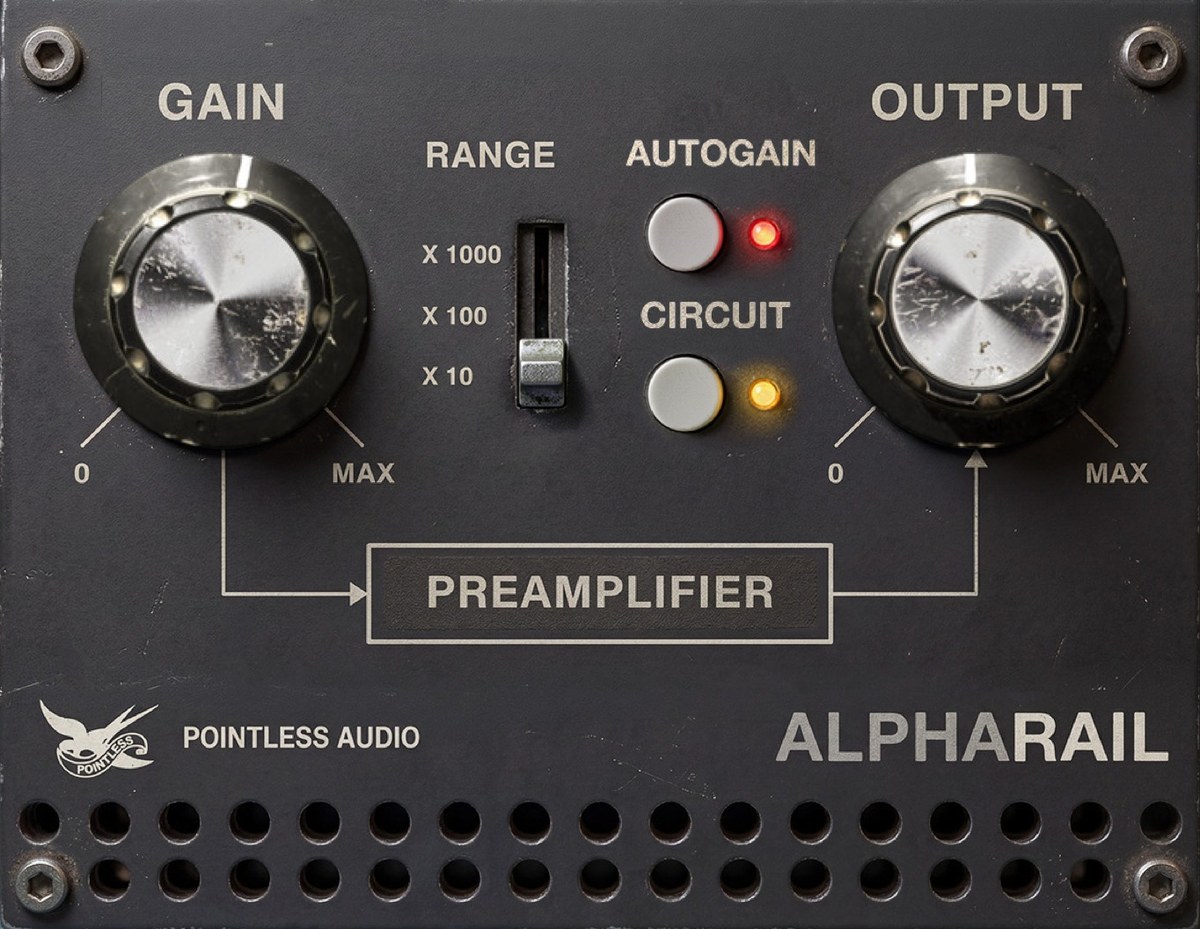
AlphaRail has four controls and one button. RANGE sets the gain of the stage; GAIN sets how hard you drive it; OUTPUT and AUTOGAIN handle level; CIRCUIT picks the engine. The four controls are automatable. Drag a knob, or hover over it, and its value shows in a popup.
| Parameter | Range | Default | What it does |
|---|---|---|---|
| GAIN | 0–100% | 55% | How hard you drive the stage |
| RANGE | 3 positions | x10 | The gain of the stage: x10, x100, x1000 (20, 40, 60 dB) |
| OUTPUT | −24 / +24 dB | 0 dB | Makeup level after the stage |
| AUTOGAIN | toggle | ON | Holds the level close to the dry signal across GAIN and RANGE |
| CIRCUIT | button | ON | The engine: Circuit (LED on) or Classic (LED off). Not automatable |
In your host's parameter list the four controls appear as Gain, Range, Output and Auto Gain, and RANGE reads x10 (20dB), x100 (40dB) and x1000 (60dB).
Changed in 0.5.0 — A new instance opens in the Circuit with AUTOGAIN on and OUTPUT at 0 dB. In 0.4, AUTOGAIN was off and OUTPUT was +4 dB. Projects and presets saved with 0.4 keep their own values and open in Classic.
GAIN
How hard you push the stage. It works differently in the two engines.
- Circuit. GAIN is the input pot in front of the op-amp, on a log taper, and it only attenuates: at 0 the signal is fully attenuated, as on the hardware. RANGE sets the gain; GAIN sets how much signal reaches it. With AUTOGAIN on, the level is made up after the stage, so GAIN plays like a drive control: the higher it goes, the harder the stage is pushed.
- Classic. GAIN is a trim of −12 to +12 dB ahead of the stage. Low and it stays clean; around the default it settles into a light, sustained saturation; wide open it drives hard into saturation for a heavy, squared-off clip. It sets the amount of drive, not the loudness — that's what OUTPUT and AUTOGAIN are for.
You can also type a value into your host's parameter field: "39" and "39%" both set GAIN to 39%.
RANGE
RANGE sets the gain of the stage: x10, x100 or x1000, that is 20, 40 or 60 dB. In the Circuit it switches the gain network around the op-amp; each step up moves the level at which the stage saturates down by about 20 dB. The input is calibrated so that 0 dBFS is about 3 V at the stage input. In Classic it sets how far past spec the stage runs, and it defines the whole character.
| Position | Circuit | Classic |
|---|---|---|
| x10 | Full bandwidth. The circuit's noise sits at about −113 dBFS (A-weighted, AUTOGAIN off) | Full bandwidth, light coloring |
| x100 | Saturates about 20 dB lower than x10. Noise at about −93 dBFS | Mid character — audible bite, the top starting to close in |
| x1000 | Saturates about 20 dB lower than x100. The circuit's noise is audible here, about −73 dBFS | Lo-fi shaper — the top end crashes, transients smear, peaks square off |
Click the lever to switch directly: top = x1000, mid = x100, bottom = x10.
OUTPUT
Makeup level after the stage, −24 to +24 dB. The default is 0 dB: with AUTOGAIN on, a new instance opens within 0.1 dB of the dry level on pink noise at −18 dBFS RMS. Projects saved with 0.4 keep the OUTPUT they were saved with: +4 dB if they used the old default.
AUTOGAIN
A loudness match. At the same GAIN, x100 and x1000 come out louder than x10, so RANGE would double as a volume jump. AUTOGAIN evens that out: you hear only the character change.
- ON (default). The level is held close to the dry signal across GAIN and RANGE. A red LED lights to the right of the button.
- OFF. You hear exactly what RANGE does, level jump included.
AUTOGAIN is a fixed table, one for each engine, both calibrated on pink noise at −18 dBFS RMS (K-weighted): nothing pumps on transients, and the match is closest near that level. On much hotter or quieter material, trim with OUTPUT. With AUTOGAIN off, the Circuit at the default settings sits about 11 dB below the dry signal.
In the Circuit, AUTOGAIN makes up at most 24 dB. With GAIN turned well down, the input pot takes away more than that and the output falls below the dry level. AUTOGAIN raises the signal, not the circuit's noise: with AUTOGAIN on, the noise is never louder than with AUTOGAIN off.
CIRCUIT
Picks the engine. The button sits under AUTOGAIN, to the right of RANGE. Amber LED on: the Circuit. LED off: Classic.
- Circuit (default for new instances). The preamp from its schematic, with a soft limiter ahead of the stage and a soft saturator after it, and the circuit's noise. A new instance, or a project reopened with AUTOGAIN off, opens without a level bump.
- Classic. AlphaRail as it was in 0.4, unchanged down to the bit: bandwidth and slew shrink as RANGE goes up, and one side of the wave clips first. No noise.
Switching is a 20 ms crossfade. AUTOGAIN has its own table for each engine: with AUTOGAIN on, the level moves by less than about 3 dB for 15 to 50 ms during the switch. With AUTOGAIN off the two engines are not level-matched.
CIRCUIT is saved with the project, with user presets and with the A/B snapshots. It is not a host parameter, so it cannot be automated. Factory presets and INIT select the Circuit; projects and presets saved with 0.4 open in Classic.
Factory presets
Hint — Click the preset name in the bottom strip to switch. The A/B buttons compare the current state to an alternate snapshot. SAVE appears when the state is dirty. INIT returns every control to the defaults of a new instance and selects the Circuit.
| # | Name | GAIN | RANGE | OUTPUT | AUTOGAIN | Character |
|---|---|---|---|---|---|---|
| 1 | Init | 55% | x10 | 0.0 dB | ON | The defaults of a new instance. |
| 2 | Clean Glue | 30% | x10 | 0.0 dB | ON | Low drive on x10. |
| 3 | Rail Bite | 20% | x100 | 0.0 dB | ON | x100 at low drive. In Classic the second harmonic stays louder than the third. |
| 4 | GBW Wall | 80% | x1000 | −11.7 dB | OFF | x1000 with GAIN at 80%. The name comes from Classic, where x1000 hits a wall at 1 kHz. |
| 5 | Slew Crush | 100% | x1000 | −11.7 dB | OFF | GAIN all the way up on x1000. |
Changed in 0.5.0 — The factory presets load the Circuit, and their OUTPUT is set for it: on pink noise at −18 dBFS RMS (K-weighted) each comes out within 0.1 dB of the dry level. Switch CIRCUIT off to hear a preset in Classic: Init and Rail Bite stay at about the same level, while Clean Glue, GBW Wall and Slew Crush are not level-matched in Classic and can differ in level. On x1000 the output barely follows the input level, so the match holds at the calibration level, and on much quieter material GBW Wall and Slew Crush come out above the dry level. Projects store parameter values, not preset names, so sessions saved with 0.4 keep their values and open in Classic.
User presets are stored as .papreset files in ~/Library/Pointless Audio/AlphaRail/Presets/ (macOS) or %APPDATA%\Pointless Audio\AlphaRail\Presets\ (Windows). They store the engine too; a 0.4 preset has no engine and opens in Classic.
How it works
You don't need any of this to use AlphaRail — but if you're curious why it sounds the way it does:
Circuit
It starts from the stage as drawn. The core of the Circuit is the whole preamp, rebuilt from its service-manual schematic and the datasheet of its op-amp: the input pot, the gain network that RANGE switches, the compensation network that keeps the op-amp stable, the op-amp's own limits and the diodes across its inputs. The op-amp is a model fitted to the datasheet curves, and the datasheet contradicts itself in places; what holds across the fitted variants is the response with the preamp's own compensation. The input is calibrated so that 0 dBFS is about 3 V, set against the saturation thresholds of one hardware 2600 unit with GAIN at maximum. It follows the behaviour of that unit; it is not a measurement of the original machine.
GAIN is a pot, RANGE is the gain. GAIN only attenuates, in front of the op-amp. RANGE sets how much the stage amplifies whatever gets through.
The top end stays open. With the preamp's compensation network the op-amp keeps its bandwidth on every range: in the model the response at x1000 stays within half a dB up to 20 kHz. That is where the Circuit parts from Classic, whose x1000 hits a wall at 1 kHz.
It colours gradually. Ahead of the stage sits a soft limiter that keeps the stage output under 8 V. After the stage, a soft saturator with a small asymmetry adds second harmonic, and a 10 Hz high-pass removes the DC that creates. At x100 the distortion goes from 1% to 10% over about 16 dB of input level. This is the plug-in's own design, chosen for playability and CPU; it is not a measurement of the original chip.
It has its own noise. The op-amp and its resistors make noise, so the model does too: 2 µV rms at the input (10 Hz–10 kHz), which is audible mostly at x1000. AUTOGAIN does not raise it. Classic has none.
It runs oversampled. The Circuit works at an internal rate of about 350–384 kHz at 44.1 and 48 kHz host rates. Latency is the same as in 0.4: 49 samples.
Classic
You don't need any of this to use AlphaRail — but if you're curious why Classic sounds the way it does:
It's an op-amp pushed past spec. The original stage was a plain utility amplifier, never meant to be driven hard. Ask it for far more gain than it was built for — that's what RANGE does — and two things give out at once.
The top end collapses. The more gain you demand, the less high frequency the stage can pass. At x10 it stays open and clean; by x1000 almost everything above the low mids is gone. That darkening is the circuit running out of bandwidth, not an EQ. In the model the corner is the gain-bandwidth product of the 1339 (1 MHz) divided by the gain: 100 kHz, 10 kHz and 1 kHz. At 44.1 and 48 kHz host rates the x10 corner is held at 0.45 of the internal rate (twice the host rate): about 40 and 43 kHz.
The slew rate runs out. The stage can't swing fast enough to follow sharp transients, so they smear and soften.
Then one side clips first — by design. Classic saturates lopsided: one half of the wave bends early, the other only much later. That imbalance is where the second harmonic comes from. It is a choice made for the sound, not something measured on the original chip. Lost highs, smeared transients, one-sided clipping: the three together are the whole character of Classic. Take any one away and it disappears.
That's why x1000 in Classic isn't a "more drive" knob — it's a bandwidth-and-slew shaper. GAIN sets how hard you push in, OUTPUT makes up the level on the way out, and AUTOGAIN keeps things loudness-matched so the character switch doesn't double as a volume jump.
Design notes
Three effects, one character (Classic). Two come from the op-amp pushed past spec: the top end collapsing and the transients smearing. The third, one side of the wave clipping first, is ours. Take any one away and the character is gone, which is why Classic runs all three rather than a single distortion curve.
x1000 in Classic is not "more saturation". It's a bandwidth-and-slew shaper. On sustained low material it strips the top away; on transients — snare, kick, percussive synth — it turns into a lo-fi shaper. Reach for it deliberately, not as a "more drive" setting.
One Classic model, not three. We had three variants ready to ship as Blue, Grey and Orange. You couldn't hear the difference between them, so there's one. The Circuit is not a fourth color: it is a different model of the stage.
Defaults that don't flatter. A new instance opens with AUTOGAIN on and OUTPUT at 0 dB, within 0.1 dB of the dry signal, so the first comparison isn't won by volume. The Circuit needs it: its GAIN is a pot in front of the op-amp, and without AUTOGAIN the default settings come out about 11 dB below the dry signal. Turn AUTOGAIN off to hear what RANGE really does, level jump included.
We kept the noise. The op-amp and its resistors make noise, so the Circuit does too. AUTOGAIN doesn't raise it, and below x1000 it stays low. Classic has none.
Installation
macOS
Double-click the PA_AlphaRail_v0.5.0_macOS.pkg installer to launch it.
Note: The installer is signed with an Apple Developer ID and notarized by Apple — macOS opens it directly, with no security warnings.
VST3 installs to /Library/Audio/Plug-Ins/VST3/, AU to /Library/Audio/Plug-Ins/Components/, CLAP (for Bitwig, Reaper, MultitrackStudio) to /Library/Audio/Plug-Ins/CLAP/. The Customize step in the installer lets you pick the formats. All binaries are Universal: macOS 10.13 or later on Intel, 11.0 or later on Apple Silicon. Restart your DAW.
Windows
No installer: the zip holds both formats. Copy the PA AlphaRail.vst3 folder to C:\Program Files\Common Files\VST3\ and the PA AlphaRail.clap file to C:\Program Files\Common Files\CLAP\ — or just the one your DAW uses. Restart your DAW.
Note: SmartScreen may warn — click "More info" → "Run anyway". The Windows binaries are not Authenticode signed.
Updating from 0.4
Projects and presets saved with any 0.4 version open in Classic with the same settings, OUTPUT included: +4 dB if they used the old default. They render bit-identical to 0.4.8 (216 test renders: 12 saved states, three sample rates, two block sizes, three signals). Against 0.4.5 the output is the same except where the saturation is driven very hard, and there the difference stays more than 58 dB below the peak. To try the Circuit on an old project, turn AUTOGAIN on and press CIRCUIT: with AUTOGAIN off the Circuit comes out quieter.
Troubleshooting
CPU usage seems high — the Circuit costs more than Classic, and more the harder you drive it. Measured on one core at 48 kHz with pink noise at −18 dBFS RMS, whole plug-in: about 3.9% at the default settings, against about 1.2% for Classic. Driven hard it costs more: up to about 11% (x10 with GAIN at maximum, the worst case we measured), 4 to 9% on x100 and 7 to 8% on x1000. Raise the buffer size if needed, or switch CIRCUIT off.
Hiss on x1000 — expected in the Circuit. It is the circuit's own noise, about −73 dBFS A-weighted with AUTOGAIN off, whatever the GAIN. AUTOGAIN never makes it louder. Classic has no noise.
Silence with GAIN at 0 — expected in the Circuit. GAIN is the input pot, and at 0 it closes completely, as on the hardware. On x1000 only the noise is left.
Much quieter after pressing CIRCUIT — with AUTOGAIN off the two engines are not level-matched. Turn AUTOGAIN on, or trim with OUTPUT.
Plugin doesn't appear in DAW — most DAWs rescan plugins on launch. In Logic Pro: Preferences → Plug-In Manager → Reset & Rescan. In Ableton: Preferences → Plug-Ins → Rescan. In Reaper: Preferences → Plug-ins → VST → Re-scan.
Bottom bar ignores clicks in Logic on macOS Tahoe — a Logic/GarageBand bug on macOS Tahoe (Apple Silicon) can stop the bottom-left corner of a plugin window from responding to clicks after the window is moved or resized, and that is where AlphaRail's bar sits (presets, A/B, INIT, S/M/L). AlphaRail applies the known workaround: it redraws a single pixel in that corner, only in Logic, GarageBand and MainStage. Other hosts are unaffected.
State doesn't persist between sessions — verify your DAW saves plugin state in the project. AlphaRail uses APVTS standard, supported by every modern DAW. The CIRCUIT setting is saved with it.
Credits
- Inspired by the input preamp section of the ARP 2600 (1971). Listening reference for Classic: a recorded demo of the Korg ARP 2600 FS reissue.
- Circuit engine: starts from the ARP 2600 service manual (the preamp on Board 1) and the datasheet of its op-amp. Input calibration set against the behaviour of one hardware 2600 unit.
- Brand, name and visual language: Pointless Audio, 2026.
- The licence and the third-party notices are in
LICENSE.txt, in the download.
Support
Bug reports, questions, feature requests: [email protected]
What to include so it gets fixed faster: https://pointlessaudio.studio/support/
Pointless Audio pointlessaudio.studio
ARP and ARP 2600 are trademarks of Korg Inc. Pointless Audio is not affiliated with, endorsed by, or sponsored by Korg. Product names are used solely to describe the hardware that inspired this plug-in. Teledyne is a trademark of Teledyne Technologies Inc.
© 2026 Pointless Audio · pointlessaudio.studio