01What it does
DriftBox is a reverb built around one big knob. DRIFT takes the tail from a short, tight room, through a lush and slowly growing space, up to a freeze: a drone that does not die away. A second big knob, SIZE, chooses the room it all happens in: BOX, BOOTH, VAULT or CANYON, with a smooth morph between them.
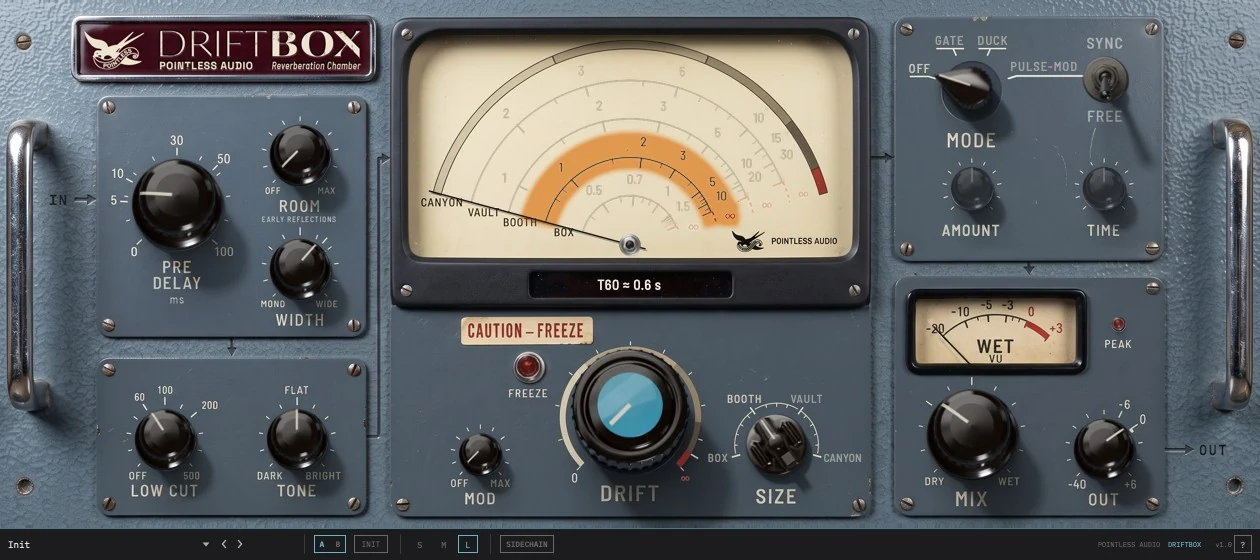
It is not an emulation of any hardware unit. It is a reverb with its own character, and its panel is laid out like a small lab receiver: a dial with a moving wire that shows the tail time, a lamp for the freeze, a meter for the wet signal.
Around the two big knobs there are a handful of controls for shaping the space (PRE, ROOM, WIDTH), for cleaning and darkening or brightening the tone (LOW CUT, TONE), for moving the tail (MOD), and for making it work with the beat (MODE: gate, duck or pulse). MIX and OUT finish the job.
02Getting started
- Put DriftBox on an insert or on a return. On an insert, start with MIX around 30 % (the default); on a return, turn MIX to WET.
- Turn DRIFT up until the tail is as long as you want. Watch the dial: the readout tells you the tail time.
- Choose the room with SIZE. Past 95 % of DRIFT the tail freezes.
Or open the preset menu at the bottom and start from one of the factory presets.
03Mouse and trackpad
- Drag a knob up or down. Drag up to turn clockwise.
- Hold Shift while dragging for fine steps.
- Mouse wheel or trackpad scroll moves the knob over it. On DRIFT each wheel notch moves the knob a small step. On LOW CUT the whole OFF zone is a single notch.
- Double-click a knob (or the dial glass for DRIFT) to return it to its default.
- Click or drag the dial glass, above the pivot, to move DRIFT to where you point.
- MODE moves one step at a time. Click a position, click its label, drag the selector up or down, or scroll over it.
- SYNC is a click; it is only live in PULSE.
While you move a control, a small pop-up above it shows the value. AMOUNT and TIME show the reading that belongs to the current mode: a threshold in dB, a time in ms, a speed in Hz or a note division.
04Parameters
Every value below is what the panel pop-up and the host show while you turn the knob. Hosts list the parameters by the names in the Host name column.
| Control | Host name | Range | Default | What it does |
|---|---|---|---|---|
| DRIFT | Drift | 0 % to 94 %, then FREEZE 0 % to 100 % | 0 % | Tail length and lushness; the top of the knob is the freeze |
| SIZE | Size | BOX · BOOTH · VAULT · CANYON, with morphs between | BOOTH | The room: tail and brightness together |
| PRE | Pre Delay | 0 to 100 ms | 5.0 ms | Gap between the dry sound and the start of the reverb |
| MOD | Mod | OFF to 100 % | OFF | Slow vibrato on the tail |
| LOW CUT | Low Cut | OFF (20 to 25 Hz) up to 500 Hz | 60 Hz | High-pass on the reverb only |
| TONE | Tone | LP 500 Hz · FLAT · +9.0 dB | FLAT | Low-pass on the left, brighter on the right |
| MIX | Mix | DRY to WET (0 to 100 %) | 30 % | Dry and wet balance |
| OUT | Output | −40.0 dB to +6.0 dB | 0.0 dB | Output trim |
| ROOM | Room (Early Reflections) | OFF to 100 % | OFF | First reflections of a room, under the tail |
| WIDTH | Width | MONO · UNITY (50 %) · up to ×1.80 | ×1.17 (65 %) | Stereo width of the reverb |
| MODE | Shape Mode | OFF · GATE · DUCK · PULSE | OFF | Shapes the reverb in time |
| AMOUNT | Shape Amount | 0 to 100 % | 50 % | Threshold (GATE) or depth (DUCK, PULSE) |
| TIME | Shape Time | 0 to 100 % | 50 % | Release time (GATE, DUCK) or speed (PULSE) |
| SYNC | Shape Sync | FREE · SYNC | FREE | PULSE speed free or locked to the host tempo |
| SIDECHAIN (bottom bar) | Sidechain | OFF · ON | OFF | GATE and DUCK follow the host's sidechain input instead of the dry sound |
| (no control) | Bypass | off / on | off | Host bypass, no control on the panel |
The centre: character
DRIFT is the heart of the plugin. At 0 % you still hear a reverb, only a short and tight one: the tail lasts well under a second on BOX and BOOTH. As you turn it up the tail grows and gets denser and lusher, gradually at first and then faster. From about 85 % the growth becomes steep but stays smooth: the tail stretches to many seconds and reaches the freeze at 95 % without a jump, so the last stretch of the knob is where you set a very long tail with care.
The readout is in percent up to 94 %. From 95 % the knob enters the FREEZE zone and the readout changes to FREEZE 0 % to FREEZE 100 %: the tail stops decaying in any way you will notice, and the further you go, the longer it hangs on. See Freeze below.
DRIFT is deliberately slow under the mouse: a full sweep takes a long drag, so you can place it with care. Hold Shift for finer steps. You can also click or drag anywhere on the dial glass above the pivot and the wire goes where you point.
SIZE chooses the room: BOX is small and quick, BOOTH is close and warm, VAULT is larger and smoother, CANYON is vast. Between the four names the knob morphs continuously and the readout says where you are, for example BOOTH→VAULT 38 %. The four names printed around the knob brighten as you get near them. SIZE is not only a size: it also changes how long the tail rings and how fast the highs fade away. So moving SIZE changes the tail time shown on the dial, and the dial's lit scale follows it.
MOD puts a slow vibrato on the reverb tail. At low settings it keeps the tail from sitting perfectly still; higher up it drifts audibly out of tune. It touches only the tail, never the dry sound, and long held notes keep a steady level. At OFF there is no movement at all.
The left: the space
PRE sets how long after the dry sound the reverb starts. It reads in milliseconds. The first 30 ms or so take up the first half of the knob, where most of the fine work is done. The value shown is the whole pre-delay: SIZE adds none of its own. At PRE 0 the reverb starts right away, about 2 ms after the dry sound in every room.
ROOM adds the first reflections of a room under the tail, stereo and slightly different left and right; the panel says so under the knob, EARLY REFLECTIONS. It does not change the size of the room: that is SIZE. At OFF you hear the tail alone.
WIDTH sets how wide the reverb is. MONO collapses it to the centre, UNITY (the middle of the knob) leaves the stereo image as it is, and the default ×1.17 gives it a gentle extra spread. The top of the knob, ×1.80, is very wide but stays safe when the signal is summed to mono. WIDTH works on the reverb only. When the plugin's output is mono the control is greyed out and has no effect; on a mono track loaded with a stereo output (mono → stereo) the reverb is stereo and WIDTH works.
LOW CUT removes low end from the reverb, not from the dry sound. At the default of 60 Hz it quietly keeps the tail from piling up in the bass. Turn it up for a thinner, cleaner reverb; at 25 Hz and below it reads OFF and the filter is out of the signal path.
TONE darkens or brightens the reverb. FLAT is the middle. To the left it is a low-pass filter on the reverb: the cutoff slides smoothly down from 20 kHz to 500 Hz, and the pop-up shows where it is (for example LP 4.8 kHz). The low-pass is also the best cure if the tail sounds too bright or a little metallic on your material. To the right the reverb opens up: up to +9.0 dB of highs, with the lows slightly lowered.
The right: movement
MODE shapes the reverb over time, and only the reverb: the dry sound is untouched. There are four positions, OFF, GATE, DUCK and PULSE-MOD (PULSE for short, and in the host). The name of the active position is printed bright, the others dimmer. Click a position, click its label on the panel, or drag the selector. With MODE at OFF, AMOUNT, TIME and SYNC are dimmed and do nothing.
The label under the AMOUNT knob changes with the mode: AMOUNT at OFF, THRESHOLD in GATE, DEPTH in DUCK and PULSE.
- GATE shuts the tail when the dry sound drops away, for the gated reverb effect. AMOUNT is the threshold and reads in dB, from −45 dB (shuts late) to −18 dB (shuts early). TIME sets how fast the tail closes, from 20 ms to 600 ms. Once open, the gate holds for a moment and closes only well below the threshold, so it does not flutter on bass notes or on a sound hovering at the threshold. At TIME 0 the cut is at its sharpest, for the classic gated snare.
- DUCK pushes the reverb down while the dry sound is playing and lets it swell back in the gaps, so the reverb stays out of the way. AMOUNT is the depth and reads in percent. TIME sets how fast it comes back, from 20 ms to 600 ms.
- PULSE makes the reverb breathe in and out rhythmically. AMOUNT is the depth. TIME is the speed: from 0.1 Hz to 20 Hz when SYNC is on FREE, or eight note divisions when it is on SYNC (1/1, 1/2, 1/4, 1/4T, 1/8, 1/8T, 1/16, 1/16T, from slow to fast). The pulse is a smooth swell, like a slow tremolo, not a hard chop. In SYNC it follows the host's beat grid while the transport runs, with the dip of each pulse on the beat. Combined with a frozen tail it makes a rhythmic freeze.
SYNC is the small lever to the right of MODE: up is SYNC, down is FREE. It works only in PULSE. In the other modes the lever is darkened and does not move, and its SYNC and FREE labels fade into the panel; hovering over it tells you what it does. In PULSE with SYNC on, the printed scale around TIME fades out and eight ticks take its place, one for each note division.
SIDECHAIN is the small switch in the bar at the bottom, to the right of S, M and L. When it is on, GATE and DUCK listen to the sidechain input of the host instead of the dry sound: a kick can duck the reverb of a pad, or open the gate on a vocal reverb. Route the sidechain in your DAW the usual way (in Logic, the Side Chain menu at the top of the plugin window; in Live, the Sidechain section of the device). With SIDECHAIN on and no sidechain signal, GATE stays shut and DUCK does not duck. If the host has no sidechain bus connected, DriftBox falls back to the dry sound. The switch is dimmed in OFF and PULSE, where it does nothing. It is not stored in presets: changing preset leaves it as it is.
The right: output
WET meter shows the level of the reverb on its own, before MIX and OUT, so it does not move when you change those. Zero on the scale (0 VU) is −14 dBFS RMS of the wet signal. The needle has a little inertia (about a third of a second) and reads from −20 to +3 dB around that zero.
PEAK is a small light under the meter. It comes on when peaks in the reverb reach the knee of the built-in limiter, and stays on for about 0.8 seconds after the last one. A brief flash is normal on loud, resonant material. If it stays lit, bring the input down or turn DRIFT back.
MIX balances dry and wet. DRY is all dry, WET is all reverb, and the default is 30 %. The balance keeps a steady loudness along the knob, and the reverb is level-matched to the dry sound around the middle of DRIFT, so 50 % sounds about even there.
OUT is an output trim, not a fader. It reads in dB, from −40.0 dB to +6.0 dB, and sits at 0.0 dB by default (70 % of the knob's travel).
05The T60 dial
The glass window at the top holds four scales, one for each room: BOX on the inside, then BOOTH, VAULT and CANYON on the outside. Each scale is marked in seconds of tail for that room. The scale of the room you have chosen with SIZE is lit; between two rooms two scales are partly lit. The thin wire sweeps from left to right as you turn DRIFT, so on the lit scale you read the tail time directly.
Below the glass, a small readout gives the tail time, written like this: T60 ≈ 0.7 s. T60 is the time the tail takes to fall by 60 dB, a standard way to say how long a reverb lasts. The reading follows both SIZE and DRIFT, and it is approximate: it comes from measurements of the plugin in the middle of the range (500 Hz to 1 kHz), blended between rooms. To give an idea of the range:
| BOX | BOOTH | VAULT | CANYON | |
|---|---|---|---|---|
| DRIFT 0 % | 0.3 s | 0.6 s | 0.8 s | 1.3 s |
| DRIFT 50 % | 0.7 s | 1.8 s | 2.4 s | 3.7 s |
| DRIFT 90 % | 3.2 s | 7.7 s | 15 s | 29 s |
When DRIFT is in the FREEZE zone the readout stops showing seconds and says FREEZE in a warm red.
06Freeze
Turn DRIFT past 95 % and the FREEZE lamp warms up (in about a third of a second), the wire turns red and the T60 readout says FREEZE. The tail now feeds itself nearly without loss: it takes minutes to fade, which in practice means it does not. A held chord keeps its level, loud or soft. The percentage after FREEZE says how far in you are; the closer to 100 %, the longer the tail hangs. Bring DRIFT back below 95 % and the lamp cools down again.
A few things worth knowing:
- Freeze is a position of the DRIFT knob, not a separate switch, so you can automate or ride it like any other parameter.
- A frozen tail keeps what it has heard and builds up while you keep feeding it, up to a ceiling where it settles. Bring MIX or OUT down if it gets loud, and watch the PEAK light.
- Stopping the transport clears the tail in most hosts. If a drone is stuck, bring DRIFT below 95 % or bypass the plugin for a moment.
- With MODE set to PULSE, the frozen tail pulses in time.
07The bottom bar
The bar under the panel is the same on all Pointless Audio plugins. From left to right:
- Preset menu, ‹ › and SAVE. The menu lists the factory presets first, then your own; the ‹ › arrows next to it step to the previous or next preset. When you change a setting the name gets an asterisk and SAVE appears; click it to save your own preset under a name. SAVE always proposes a new name (for example "Init 2"), so OK never overwrites an existing preset; if your host does not let you type in the field, OK saves under the proposed name. Your presets are portable
.papresetfiles. - A/B. Two complete settings to compare. Clicking A/B switches between them. The first time you go to B, it starts as a copy of what you were just hearing, so you can change one thing and compare.
- INIT. Back to the default settings.
- S M L. Three window sizes: small (708 × 329 pixels), medium (945 × 428) and large (1260 × 560), bar included. The size is saved with your project.
- ? A quick guide over the panel, at the medium and large sizes. The first page says what DriftBox does and how to start; the next four light up one part of the panel at a time and say what each control does. Step through with ‹ › or the arrow keys, close with ? or Esc. While the guide is open the controls under it do not respond, so you cannot change anything by mistake.
08Factory presets
DriftBox comes with 20 factory presets, Init included. Their output level is set to within about 1 LU (measured loudness) of the dry sound, so switching between them does not jump in loudness. Load one, then turn DRIFT, SIZE and MIX to fit your track.
| Preset | What it is |
|---|---|
| Init | The default settings |
| Drum Room | A short, tight BOX with early reflections, for drums that need a room but no tail |
| Vocal Plate | A smooth VAULT with 40 ms of pre-delay, a little movement and a touch of air, for vocals |
| Freeze Pad | A frozen, slightly dark VAULT, wide and moving: hold a chord and it becomes a pad |
| Pulse 1/8 | A medium tail that pulses in eighth notes with the host tempo |
| Golden Dancehall | A long, ducked hall with 100 ms of pre-delay and deep movement |
| Blessing Chamber | A chamber full of early reflections that ducks under the dry sound |
| Calling Out | A bright, very wide room with strong reflections |
| Snare Straddled | A dark, long, ducked BOX that blooms after each hit |
| Clay Walls | A dark, mono, wobbling small room |
| Falling Through | A huge, bright, mostly wet space between VAULT and CANYON |
| Snowbound | A dark frozen tail that swells in and out slowly |
| Cavernous Ricochet | A very long, very dark tail with a fast flutter |
| Crosswinds | A small, narrow room with a long tail that pulses and moves |
| Do Tubetrains Have Tiles | A short, very bright mono room that ducks lightly |
| Headhung 424 | A short, gated VAULT with deep movement |
| Jagged Edge | A small room that pulses hard and slowly |
| Reeled In and Wandered | A very long, bright, very wide space full of early reflections |
| Well of Said | A wide BOOTH that pulses gently, with deep movement |
| Wendy | A very long, dark, mono VAULT with maximum movement |
Fifteen of the factory presets, from Golden Dancehall to Wendy, are by Andi, one of the beta testers. Thank you.
Factory presets cannot be overwritten or deleted. Change one and save it under a new name to keep your version.
09How it works
You do not need any of this to use DriftBox, but if you are curious what is behind the panel:
The tail comes from a set of delays that feed one another, so a sound goes round and round, spreading out and losing energy a little each time. DRIFT sets how much comes back round each time. A little, and the tail fades quickly; almost all of it, and it hangs on. The top of the knob lets almost everything come back, which is the freeze. SIZE changes the length of the delays and how quickly the highs fade, which is why each room has its own character and not just a different tail length. In the three larger rooms the lows ring a little longer than the mids, as in a good concert hall, which keeps the tail warm.
Before the tail, the incoming sound is smeared across the delays so the reverb starts dense and smooth rather than as a row of separate echoes. The left and right inputs feed different delays: a sound panned to one side gets as much reverb as one in the centre, and a wide stereo source stays wide in the tail. The first stages of that smearing are also heard on their own, as the very first echoes, so the reverb starts right after the pre-delay instead of waiting for the tail to build. ROOM adds early reflections alongside. After the tail come the LOW CUT and TONE filters, the stereo spread and, when MODE is on, the gate, ducker or pulse. All of that works on the reverb only. The dry sound goes straight to MIX.
MOD is a slow vibrato applied to the tail after it is made, not inside the loop. That is why held notes do not pump in level when MOD is up.
The wet limiter is a safety stage that works on the reverb only. A steady note that lands on a resonance of the room can make the tail jump in level; the limiter sees it a moment ahead and lowers the level smoothly instead of clipping the waveform, so held notes stay clean. It adds no delay for the host.
10Installation
macOS
Install from the download following the instructions that come with it, then restart your DAW. If you copy by hand, the standard folders are /Library/Audio/Plug-Ins/Components/ for AU, /Library/Audio/Plug-Ins/VST3/ for VST3, /Library/Audio/Plug-Ins/CLAP/ for CLAP and /Library/Application Support/Avid/Audio/Plug-Ins/ for AAX.
Windows
Install from the download following the instructions that come with it, then restart your DAW. If you copy by hand, the standard folders are C:\Program Files\Common Files\VST3\ for VST3, C:\Program Files\Common Files\CLAP\ for CLAP and C:\Program Files\Common Files\Avid\Audio\Plug-Ins\ for AAX.
Pro Tools (AAX)
The AAX format is a real-time insert, in Pro Tools on macOS and Windows. It has no AudioSuite version.
Linux (beta)
The Linux build has been checked with automated tests, not yet in everyday use in a DAW: reports are very welcome. Copy PA DriftBox.vst3 to ~/.vst3/ and PA DriftBox.clap to ~/.clap/ (create the folders if they do not exist), then restart your DAW and rescan. It needs 64-bit x86 Linux with glibc 2.35 or newer (Ubuntu 22.04, Linux Mint 21, Debian 12, Fedora 36 or later; check with ldd --version). The C++ runtime is built in: no extra package is needed.
11Troubleshooting
No reverb, or very little — check MIX first (DRY is no reverb at all). Then check MODE: with GATE and a high threshold the tail closes almost at once. At DRIFT 0 % the reverb is short by design: raise DRIFT or choose a larger SIZE.
The tail never stops — DRIFT is in the FREEZE zone (the lamp is lit and the readout says FREEZE). Bring DRIFT below 95 %.
AMOUNT, TIME or SYNC is dimmed — MODE is at OFF, or, for SYNC, MODE is not on PULSE. That is intended.
WIDTH is dimmed — the plugin's output is mono. On a mono track, load DriftBox with a stereo output (in Logic, the Mono → Stereo version) to get a stereo tail and WIDTH.
PEAK stays lit — the reverb is being limited most of the time. Lower the input level or turn DRIFT back. A frozen tail builds up, so a long freeze can need a lower MIX.
The tail sounds too bright or metallic — turn TONE to the left of the middle: the low-pass takes the edge off.
A session from the beta sounds different — in 1.0 the TONE low-pass goes down to 500 Hz instead of 1.2 kHz. Sessions and presets saved with the beta are converted when they open, so a TONE set left of FLAT keeps the same cutoff; only TONE automation drawn in the beta plays a little darker. In sessions from 0.9.3 or earlier, a ROOM set above OFF also sounds louder (about three times): set it to a third. The factory presets are already adjusted.
The plugin does not appear in the DAW — rescan the plugins in your DAW (most do it on launch). Logic Pro: Plug-In Manager, Reset & Rescan. Ableton Live: Preferences, Plug-Ins, Rescan. Reaper: Preferences, Plug-ins, VST, Re-scan.
12Credits
- Brand, name and visual language: Pointless Audio, 2026.
- Fifteen factory presets, Golden Dancehall to Wendy: Andi.
- Built with JUCE.
- The license and the third-party notices are in
LICENSE.txt, in the download.
13Support
Bug reports, questions, feature requests: [email protected] · https://pointlessaudio.studio/support/
To report a problem, it helps a lot if you tell us:
- what you were doing and what you expected;
- the DAW and its version, the operating system, and the format (AU, VST3, CLAP or AAX);
- whether it happens every time, and whether it depends on a particular setting, preset or project;
- for anything about sound, which settings (DRIFT, SIZE, MODE and MIX are the usual suspects).
Web: https://pointlessaudio.studio
Pointless Audio pointlessaudio.studio
DriftBox is an independent project by Pointless Audio and is not an emulation of any hardware product. All product names mentioned are trademarks of their respective owners.
© 2026 Pointless Audio · pointlessaudio.studio