COMPATTO
Manual
v1.2.2 · VST3 + AU + CLAP · macOS (Universal) + Windows 10+ (VST3 + CLAP)
What it does
Compatto is an electronic combo organ: a polyphonic MIDI instrument modelled on the transistor combo organs of the 1960s.
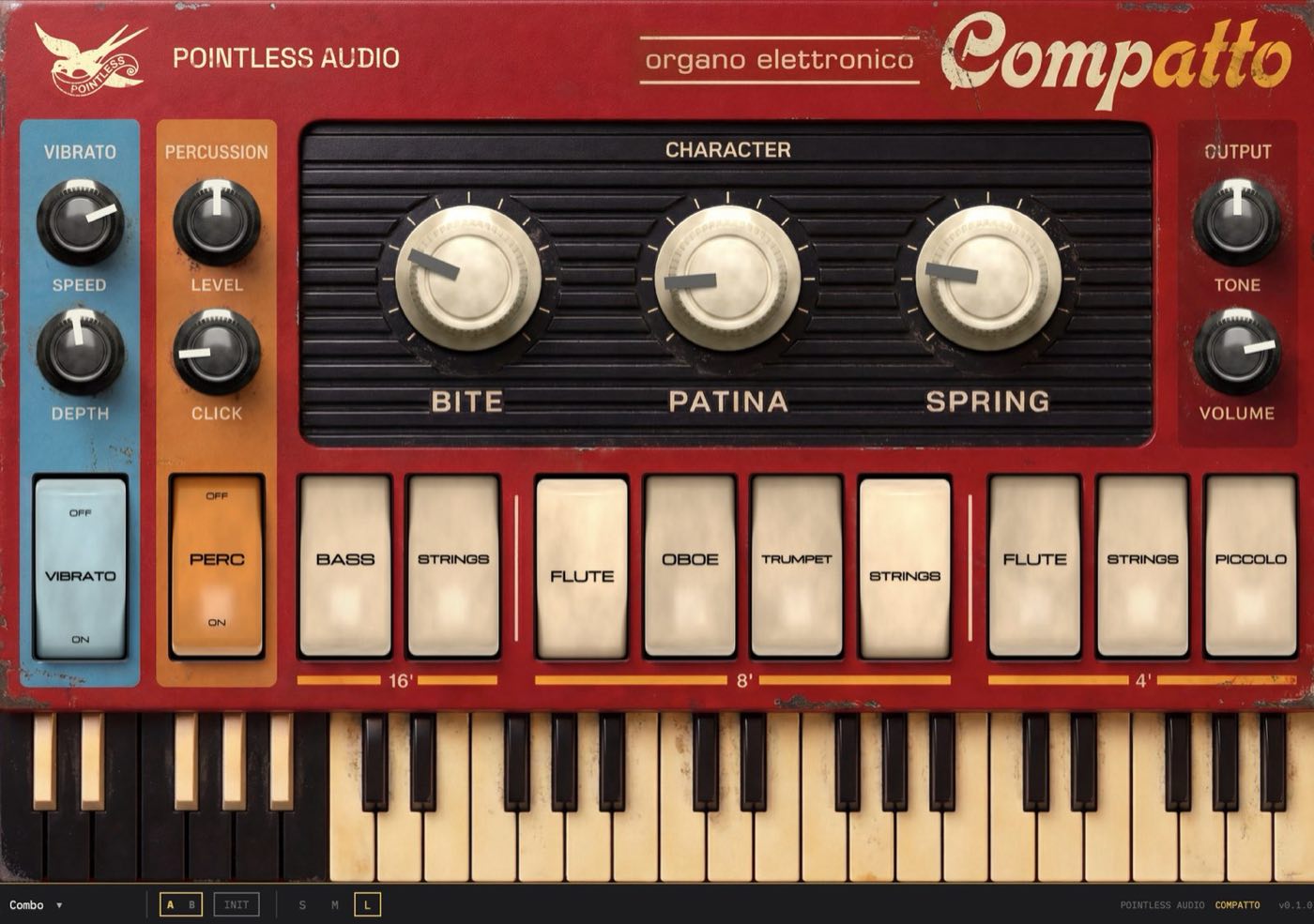
Switch the voice tabs to build a registration, add percussion for the attack, open the vibrato, and add the onboard spring reverb. Three CHARACTER knobs (Bite, Patina, Spring) set how much edge, wear and reverb the sound carries.
It has nine voices across three octave registers, a vibrato, a percussion stage with key click, an onboard spring reverb, and an expression input (CC11) for a swell pedal.
The combo organ legacy
The electronic combo organs of the mid-1960s, among them Farfisa's Compact series (1964–68), were compact, light and portable, and built to a price. They generated their notes by divide-down: one oscillator on top, the octaves below obtained by dividing its frequency. That is why the registers are tied together and the tone is so square.
Compatto models the character of that instrument: the divide-down voices, the vibrato, the percussive key click, the onboard spring. It adds a PATINA control for tape-style wear. It is not a copy of any one make or model; it models the class of instrument.
Parameters
Compatto is played from a MIDI keyboard, or from the keyboard drawn on the panel: click its keys to play, and it shows the notes being held. The on-screen keyboard covers C2 to B5 (MIDI notes 36 to 83), sends on MIDI channel 1 at a fixed full velocity, and has no velocity response. The panel builds the sound: voice tabs on the bottom, character and output above.
| Section | Control (panel name) | Host name | Range | Default | What it does |
|---|---|---|---|---|---|
| Voices 16' | BASS, STRINGS | Bass 16', Strings 16' | on/off | off | Octave below the played note |
| Voices 8' | FLUTE, OBOE, TRUMPET, STRINGS | Flute 8', Oboe 8', Trumpet 8', Strings 8' | on/off | Flute + Strings on | The played note |
| Voices 4' | FLUTE, STRINGS, PICCOLO | Flute 4', Strings 4', Piccolo 4' | on/off | off | Octave above the played note |
| voice level (drag a tab) | Voice name + " Trim", e.g. Flute 8' Trim | −24…+6 dB | 0 dB (100%) | Press a tab and drag up or down to set the level of that voice | |
| Output | TONE | Bright | 0–1 | 0.5 | Below 0.5: low-pass roll-off. Over the whole range: a high-pass pulse component added in proportion to the square of the position |
| VOLUME | Volume | −60…+12 dB | −3 dB | Master level (0 dB = unity gain). Shown as −inf at −59.5 dB and below | |
| Vibrato | VIBRATO switch (ON) | Vibrato On | on/off | on | Turns the vibrato on |
| SPEED | Vibrato Speed | 0.5–10 Hz | 6.50 Hz | Vibrato rate | |
| DEPTH | Vibrato Depth | 0–80 cents | 38 | Vibrato amount | |
| Character | BITE | Bite | 0–1 | 0.25 | Asymmetric soft clipping with a low-pass ahead of it |
| PATINA | Patina | 0–1 | 0.10 | Tape-style wow, flutter, saturation, high-frequency loss, hiss and level dropouts | |
| SPRING | Spring | 0–1 | 0.20 | Onboard spring reverb | |
| Percussion | PERC switch (ON) | Percussion | on/off | off | Turns the percussive attack on |
| LEVEL | Perc Level | 0–1 | 0.50 | Level of the attack | |
| CLICK | Click | 0–1 | 0.15 | Key click on each note; also sets the percussion decay time |
Voices
The nine voice tabs stack like drawbars, across three octave registers: 16' (one octave below the played note), 8' (the played note), 4' (one octave above). Switch on one tab for a single voice, or several for a fuller registration. Each footage has its own voices: Bass and Strings at 16'; Flute, Oboe, Trumpet and Strings at 8'; Flute, Strings and Piccolo at 4'. Flute 8' and Strings 8' are on by default.
Setting the balance. A tab is not only a switch. Press it and drag up or down to set the level of that voice: a small readout shows the level as a percentage while you drag, and the setting stays where you leave it. Drag up to raise a voice, down to lower it. The drag moves the level by 0.25 dB per pixel of panel movement, so 120 pixels cover the whole −24 to +6 dB range.
A plain click still switches the voice on and off: the drag only takes over once the pointer has moved more than 3 pixels. Every voice starts at 100%, so a registration you built before behaves as it always did until you change it. The level is a normal automatable parameter (−24 to +6 dB in 0.1 dB steps, 0 dB = 100%, −24 dB = 6%, +6 dB = 200%), so a host can record and recall it like any other control. In the host the nine levels are named after the voice with " Trim" added, for example Flute 8' Trim. The levels are saved in your own presets. Loading a factory preset, or pressing INIT, returns all nine to 100%.
Output
TONE — the overall brightness. From the centre (0.5) downward, a 6 dB-per-octave low-pass filter closes progressively, from about 14 kHz just below the centre to 1.3 kHz at the minimum. At the centre and above, the low-pass is out of the signal path. Over the whole range, a copy of the raw oscillator pulse, high-passed at 1.5 kHz, is added to the voices with a gain equal to the square of the knob position: 0 at the minimum, 0.25 at the centre, 1 at the maximum. (The panel says TONE; the host automation parameter is Bright.)
VOLUME — master level, in dB, with unity gain at 0 and 12 dB of gain above it. The knob travel is non-linear: the centre of the travel is −3 dB, the default. The output stage is a soft clipper that is linear up to 0.89 (−1.0 dBFS) and rounds off towards a ceiling of 0.99 (−0.09 dBFS). With VOLUME turned up, chords and clusters can reach it.
Vibrato
The wobble that made these organs sing.
ON — turns the vibrato on (it's on by default). SPEED sets the rate, DEPTH how far it swings. The mod wheel (CC1) sets DEPTH directly, from 0 cents with the wheel at the bottom to 80 cents at the top, and the DEPTH knob follows it. The wheel takes control from the first CC1 message with a value above zero. After that, the DEPTH knob moves only when the wheel moves.
Character — Bite, Patina, Spring
Three macros set the edge, the wear and the reverb of the sound.
BITE — the reed edge. An asymmetric soft clipper whose input low-pass opens from 1.8 kHz towards the top of the audio band as the knob goes up. At zero it is out of the signal path.
PATINA — tape-style wear. It adds a slow pitch wobble (wow, about 0.7 Hz), a faster one (flutter, about 7.9 Hz), tape-style saturation, high-frequency loss, hiss and short level dropouts. At zero this stage is out of the signal path. The small tuning offsets and slow drift of the master oscillators (see How it works) are always present and are not controlled by PATINA.
SPRING — an onboard spring reverb, with its own stereo tail. At zero it is out of the signal path and the output is identical on both channels.
Percussion
ON turns on a percussive tone on the attack of each note: it is a tone one octave above the played note that decays after the attack. With ON off, the voices sustain with no percussive tone. LEVEL sets its level. CLICK adds the key noise of the contacts closing and opening: it is there on every note whether the percussion is on or off. CLICK also sets the percussion decay: the decay time constant runs from 120 ms with CLICK at 0 to 400 ms with CLICK at 1.
Expression
An expression pedal (CC11) swells the volume under your foot, modelled on a photocell pedal: it is useful for fades and dynamic swells while both hands stay on the keys. It takes control from the first CC11 message with a value above zero; a CC11 value of 0 received before that is ignored. A fully closed pedal lowers the organ by about 24 dB rather than silencing it. The pedal response follows the position with a lag of about 25 ms.
Other MIDI
Compatto responds to notes, CC1 (mod wheel), CC11 (expression), CC64 (sustain pedal), CC120 (all sound off) and CC123 (all notes off), on any MIDI channel. MIDI velocity, pitch bend and aftertouch have no effect.
Factory presets
| # | Preset | Settings |
|---|---|---|
| 1 | Combo | Flute 8' + Strings 8', vibrato 6.5 Hz / 38 cents, TONE 0.50, BITE 0.25, PATINA 0.10, SPRING 0.20. The reference tone |
| 2 | Riviera | Flute 8' + Strings 8' + Piccolo 4', TONE 0.60, vibrato 4.5 Hz / 22 cents, SPRING 0.80 |
| 3 | Cantina | Oboe 8' + Trumpet 8', BITE 0.70, PATINA 0.30, percussion on |
| 4 | Notturno | Bass 16' + Strings 16' + Flute 8', TONE 0.20, vibrato 5.0 Hz / 30 cents |
| 5 | Carosello | Flute 8' + Flute 4', percussion on (LEVEL 0.75, CLICK 0.85), vibrato off |
| 6 | Basilica | Bass 16' + Flute 8' + Flute 4' + Strings 4', SPRING 0.40 |
| 7 | Miraggio | Flute 8' + Oboe 8' + Strings 8', vibrato 7.5 Hz / 70 cents |
| 8 | Aurora | Strings 8' + Strings 4' + Piccolo 4', BITE 0, PATINA 0.25, SPRING 0.70 |
Each factory preset sets 20 of the 29 parameters, and sets the nine voice levels to 100%. Save your own presets with SAVE. They are stored as .papreset files in the Pointless Audio/Compatto/Presets folder inside your user application-data folder (on macOS ~/Library/Application Support, on Windows %APPDATA%).
The bottom strip has, from left to right: the preset menu (FACTORY and USER lists and Save as…; the trash icon beside a user preset deletes it), SAVE (active once a parameter has changed since the preset was loaded), A/B (swaps between two stored states), INIT (sets every parameter to its default value, as listed in the table above), and the S M L buttons that set the window size to 548 × 400, 731 × 522 or 975 × 686 pixels. The window opens at M.
How it works
You don't need any of this to play Compatto — but if you're curious what's under the panel:
The voices come from twelve master oscillators, one for each note name, divided down into octaves, the way the original combo organs made their notes. The division is exact, so the registers stay locked together. Each master oscillator has a small fixed tuning offset (a random value with a spread of 3.5 cents) and a slow drift (about 0.8 cents, at about 0.1 Hz). Both belong to the oscillators and are not controlled by PATINA.
The character stages colour that raw tone: BITE is an asymmetric soft clipper, PATINA adds tape-style wear, and SPRING is a spring-reverb model.
The percussion is a tuned tone one octave above the played note that decays after the attack, plus a separate key click, so notes start with a defined edge instead of fading in.
Design notes
Worn on purpose. The instrument this models was never precise, and Compatto keeps that: the oscillators' tuning offsets and drift are always present, and PATINA adds the tape-style wear on top of them.
Play it like an organ. Tabs stack like drawbars, percussion and vibrato are performance controls, and the mod wheel and expression pedal are meant to move while you play.
The tabs are voices, not presets. Each one adds a voice at its footage; combining them builds the registration.
Installation
macOS
Double-click the .pkg installer in the download and follow it — the Customize step lets you pick VST3, AU and CLAP. Formats install system-wide to /Library/Audio/Plug-Ins/VST3/, /Library/Audio/Plug-Ins/Components/ and /Library/Audio/Plug-Ins/CLAP/. Restart your DAW. All binaries are Universal (Apple Silicon + Intel) and run on macOS 10.13 or later (11 on Apple Silicon).
Note: The installer is signed with an Apple Developer ID and notarized by Apple — macOS opens it directly, with no security warnings.
Windows
Copy the PA Compatto.vst3 folder to C:\Program Files\Common Files\VST3\, and/or the PA Compatto.clap file to C:\Program Files\Common Files\CLAP\ — or to the custom plugin folders your DAW uses. Restart your DAW. Windows 10 or later, 64-bit. (Audio Unit is macOS only.)
Troubleshooting
No sound — Compatto is a MIDI instrument: it needs MIDI notes coming in. Check the track's MIDI input, that at least one voice tab is on (Flute 8' and Strings 8' are on by default), and that VOLUME isn't at the bottom.
Suddenly much quieter — a knob or fader on your controller may be sending CC11 (expression). Compatto treats it as the swell pedal: send CC11 back up, or unmap the control. A fully closed pedal lowers the level by about 24 dB.
Plugin doesn't appear in the DAW — most DAWs rescan on launch. Logic Pro: Preferences → Plug-In Manager → Reset & Rescan. Ableton: Preferences → Plug-Ins → Rescan.
State doesn't persist between sessions — check your DAW saves plugin state in the project. Compatto uses the standard state format supported by every modern DAW.
A note hangs after you bypass the plugin in the host — while the host's bypass is engaged, Compatto does not receive MIDI, so a note-off that arrives during bypass is lost and the note is still sounding when you re-enable it. Send All Notes Off (CC 123) or stop and restart the transport: both release every held note.
Mod wheel in an offline bounce — the mod wheel (CC1) drives DEPTH through a timer that runs at 60 updates per second on the host's main thread. In a faster-than-realtime bounce or freeze the wheel can be applied late or in steps, so the bounce may differ from what you heard live. If a part relies on the wheel, automate DEPTH directly or bounce in real time.
Credits
- Inspired by the 1960s Italian electronic combo organ. Modeled by character, not cloned from any one instrument.
- The licence is in the
LICENSE.txtfile of the download. - Brand, name and visual language: Pointless Audio, 2026.
Support
Bug reports, questions and feature requests: write to <[email protected]>, or see the support page at https://pointlessaudio.studio/support.
Pointless Audio pointlessaudio.studio
Compatto is not affiliated with or endorsed by Farfisa or any organ manufacturer. All trademarks are the property of their respective owners and are used only to describe the class of instrument that inspired this plugin.
© 2026 Pointless Audio · pointlessaudio.studio