FERROTANK
Manual
v0.8.0 · VST3 + AU + CLAP · macOS (Universal) + Windows 10+ (VST3 + CLAP)
What it does
Ferrotank is a playable spring reverb. It models a whole tube-driven spring tank: a tube preamp that drives the springs, the springs themselves with their chirp, and a bias-style tremolo on the way out.
It isn't an impulse response or a hall algorithm. It chirps, it blooms, and if you hit it hard enough it crashes — because that's what a real spring tank does.
One knob takes it from a soft, warm wash to a full surf drip: turn DRIP down and the springs blend into a smooth tail with more body; turn it up and the echoes stand out, the drip stretches and the top end sparkles. DWELL works like the pot on the original, DECAY sets the tail, and TANK changes the whole spring geometry underneath. Guitars, keys, drums and synths all take to it. And the spring tank on the panel is playable: click, pluck or hold the springs with the mouse, or play them from a MIDI key or pad.
The 6G15 legacy
The 6G15 reverb unit (1961–1963) was a standalone, tube-driven spring reverb built to sit ahead of a guitar amp. Its own tube preamp drove a spring tank hard, producing a dripping, splashy chirp with far more character than the reverb built into the amps of the day.
That sound became one of the defining textures of early-1960s surf music — the reverb most associated with Dick Dale — and it has stayed a studio favourite for surf, garage and cinematic guitar ever since.
Ferrotank models the character of that circuit — the tube warmth, the spring chirp, the tank resonances — not any specific artist or recording. Impulse responses of a real 6G15 unit were used only as a tuning reference; none of them ship with the plugin.
Parameters
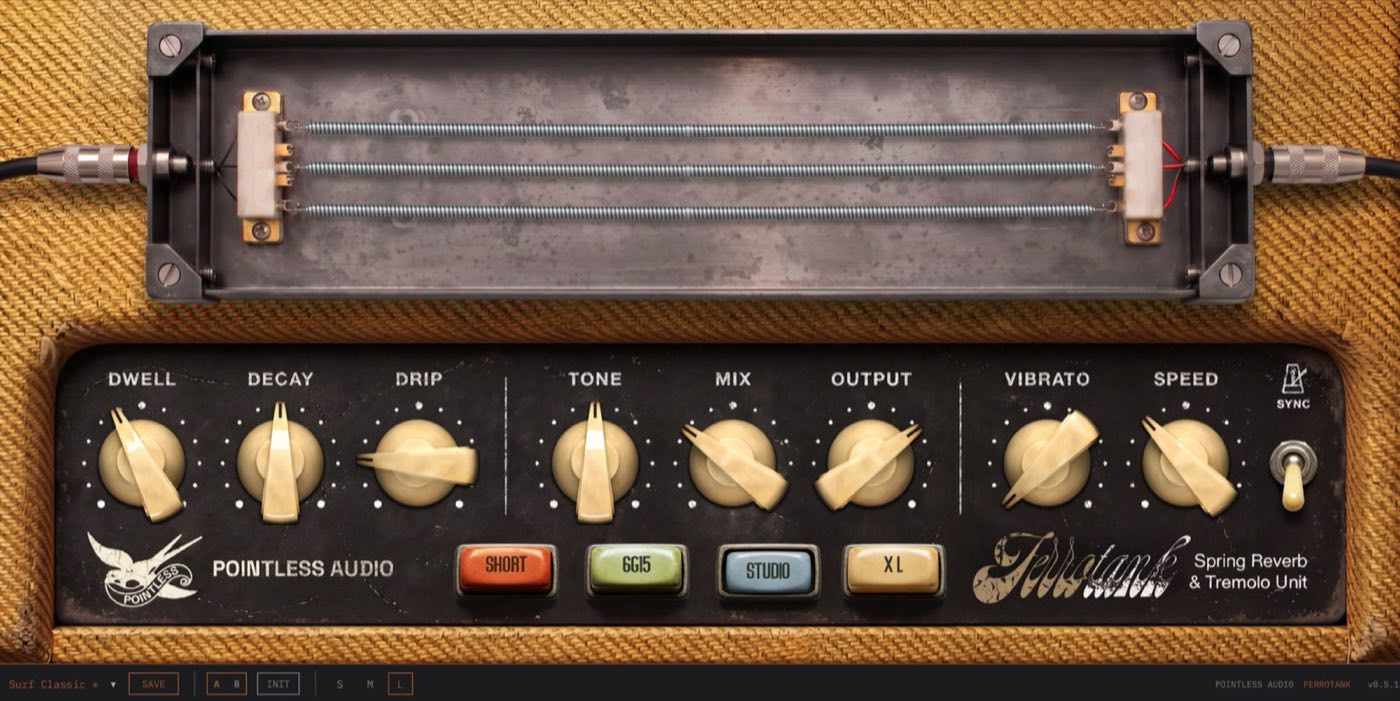
Ferrotank has ten controls on the panel, plus bypass and one host-only parameter, Touch (see Playing the springs). The eight knobs and the SYNC switch sit in one row across the panel, in three groups: the springs (DWELL, DECAY, DRIP), tone and level (TONE, MIX, OUTPUT) and the tremolo (VIBRATO, SPEED, SYNC). The tank selector sits below them. Values show in the unit given here, on the panel pop-up and in the host.
| Parameter | Range | Default | What it does |
|---|---|---|---|
| DWELL | 0–100 % | 40 % | What the springs get: level and drive, like the original pot |
| DECAY | 0–100 % | 50 % | Reverb tail length |
| DRIP | 0–100 % | 30 % | How much spring: soft and warm → full surf drip |
| TONE | 0–100 % | 50 % | Dark to bright |
| MIX | 0–100 % | 30 % | Dry / wet balance |
| OUTPUT | −∞ to +6 dB | 0.0 dB (70 %) | Output trim in dB |
| VIBRATO | 0–100 % | 0 % | Tremolo depth (0 = off) |
| SPEED | 0.5–12 Hz | 4.5 Hz | Tremolo rate |
| SYNC | off / on | off | Lock the tremolo to host tempo |
| TANK | Short / 6G15 / Studio / XL | 6G15 | Which spring tank |
| BYPASS | off / on | off | Full bypass |
| Touch | 0–100 % | 0 % | Host only, not on the panel: map it to a key, pad or automation to play the springs |
The springs
DWELL — the Dwell pot of the original unit: it sets how much signal reaches the springs and how hard the tube pushes them. It follows the real pot's curve. At zero the springs get nothing, so the reverb is silent. The level climbs quickly over the first third of the knob and flattens out towards the top. Low settings sound thinner and brighter, the way the real unit does; higher settings get fuller and, near the top, driven. The first tube stage also reacts to how hot your input is, at any DWELL: hit it with a loud source and the reverb thickens and rounds off its peaks.
DECAY — the tail. At 50% each tank rings for its natural length — about 2.85 seconds (to 60 dB down, at 1 kHz) for the 6G15, like the real unit. Turn it down to about a third of that for a tight, percussive reverb, or up to about two and a half times for a long wash. The range follows the tank, so the short tank stays shorter even at maximum.
DRIP — how much spring you hear, and the one control with no equivalent on the original unit. At 50% the springs behave as they are (on the 6G15 tank, tuned against the real unit). Turn it down and the springs soften: the echoes blend into a smooth tail, the highs die away sooner, the chirp gets shorter and the tank gains body — gentle enough for vocals, keys and mixes that just need space. The default, 30%, sits there. Turn it up past the middle for surf: a longer drip, more distinct echoes and more of the bright zing on top. It works the same way on every tank, and it glides when you move it.
Tone and level
TONE — a single tilt from dark to bright, flat at noon. It colours how you hear the tank rather than the springs themselves.
MIX — dry / wet balance. The dry signal always stays stereo; only the wet is summed to mono into the tank and spread back out. The mix is equal-power (the dry follows a cosine and the wet a sine of the knob position), so the level stays steady along the knob. At 100% wet (send/bus use) the tremolo acts on the reverb only.
OUTPUT — a trim on the way out, not a fader. It reads in dB: 0.0 dB at the default of 70 %, +6 dB at 100 %, about −7 dB at 50 % and −24 dB at 3 %. Below 3 % the level falls to silence, reached at 0 %. For an actual mute, use BYPASS or pull MIX down.
The tank
TANK — picks one of four spring tanks. They're physically different, not tonal presets — different spring lengths, numbers of springs and decay — and they're level-matched, so switching never jumps in volume. (The springs drawn on the panel are a stylised view of the tank, not a count.)
- Short — two short springs: tight, bright, punchy. Amp-style spring / rock guitar.
- 6G15 — the reference: two springs of different length, as in the real unit, with first echoes at about 30 and 39 ms that return every 59 and 77 ms. Classic surf, clean guitar, Rhodes. The default.
- Studio — four springs: a longer, denser tail.
- XL — four long springs: the longest tail and the latest first echo (from about 33 ms). Ambient and post-rock washes.
Tremolo
VIBRATO — tremolo depth, modelled on a vintage bias tremolo. (The panel says VIBRATO because these amps famously mislabelled the tremolo that way — we kept the label; the host automation parameter is DEPTH.) At 0 it's fully off and costs no CPU. As you raise it the modulation deepens and hardens from a gentle sway toward a firmer throb. Because it sits after the mix, it moves the dry and wet together.
SPEED — tremolo rate. With SYNC off it's a free rate; with SYNC on it snaps to musical divisions of the host tempo (1/2 down to 1/16, including triplets).
SYNC — locks SPEED to the host tempo. If the host gives no tempo, SPEED stays free.
BYPASS — full bypass with a short crossfade. Usually handled by the host. While bypassed, Ferrotank stops processing and uses almost no CPU; when you switch it back on, the tank starts empty, so whatever played during the bypass doesn't ring out.
Factory presets
| # | Preset | Tank | Character |
|---|---|---|---|
| 1 | Surf Classic | 6G15 | The reference drip, a touch past the real spring. No tremolo |
| 2 | Drip Splash | Short | Bright and splashy — high drip, driven, tight surf chirp |
| 3 | Long Wash | Studio | Soft and warm: a smooth four-spring tail with a slow, shallow tremolo |
| 4 | XL Ambient | XL | A long, soft four-spring wash with a gentle tremolo |
| 5 | Tremolo Surf | 6G15 | Classic surf with a deeper bias tremolo |
| 6 | Astral | XL | The softest springs and the longest tail: a slow ambient float |
Save your own as portable .papreset files, shareable between machines and projects. Browse them from the bottom strip: the preset menu, SAVE (it appears once you've changed something), the two A/B slots, INIT to return to defaults, the S M L buttons that set the window size, and the MIDI button, which opens the MIDI panel. A preset stores the ten panel controls. It does not store Touch or the MIDI settings, and INIT leaves BYPASS and Touch as they are.
Playing the springs
The spring tank on the panel answers the mouse, a MIDI key or pad, and the Touch parameter. Each tank has its own original spring recording. The recording supplies the first 150 ms of every strike and also feeds the modelled springs, which supply the tail: the tail follows TANK, DRIP and DECAY, and DECAY lengthens or shortens the recording's own tail by the same law. The touch goes through TONE, MIX, the tremolo and OUTPUT like the rest of the wet signal, so at MIX 0 it is silent. While BYPASS is on, strikes are dropped.
A strike takes its recorded onset from the strength of the gesture, taking turns among the three nearest onsets, and its level and speed vary a little each time. Soft strikes are quieter and darker.
With the mouse
- Tap — a quick click on a spring plays it. The strength follows the pointer speed on arrival.
- Pluck — press a spring, pull it and let go. The strength follows the pull and the release speed, and the strike lands where you grabbed the spring, in the direction of the pull.
- Hand — keep the button down on a spring for more than about 120 ms, or pull it, and a hand rests on it: the tail is damped and the highs are taken out while you hold.
- Tension — a spring pulled while held rises in pitch.
- Scrape — with a hand on a spring, drag sideways to rub the coils. The faster the drag, the faster the scrape.
- Kick — click on the frame, away from the springs, to knock the tank. The strength follows the pointer speed.
Moving the pointer over the springs makes them sway on screen without playing them.
With a MIDI key or pad
Click MIDI on the bottom strip to open the panel. Click a selector to step to the next value; Shift-, Alt-, Ctrl- or right-click steps back.
- INPUT — OFF (TOUCH PARAMETER ONLY), or a MIDI device found by the plugin. A device is read by the plugin itself, with true velocity and no "MIDI To" routing in the DAW. Notes that the DAW sends to the plugin are not used in this version.
- CHANNEL — OMNI, or channel 1 to 16.
- KEY — LEARN makes the next note or controller (CC) you press the touch key; CC 1, 64 and 123 cannot be learned. ANY makes every note play. With a note learned, only that note plays. With a CC learned, a value of 3 or more is a key down, with strength value/127, and a lower value is the key up.
- RELEASE — what happens when the key is let go: RING OUT leaves the spring ringing; SOFT (the default) rests a light hand on the spring for about a second, which shortens the tail without cutting it; DAMP rests a firmer hand for about a third of a second, which stops the tail.
- A line under the selectors shows the last note or CC received. TEST plays one strike and CLOSE closes the panel.
The velocity of a note is the strength of the strike; the pitch of the note does not matter. A strike lands on the spring and point the mouse last brushed or grabbed; if the mouse has not touched the springs, the springs take turns. The settings are saved with the project, not with presets.
The key also carries expression:
- Press length — with SOFT or DAMP, a key released within 150 ms rests a hand on the spring (staccato). A key held longer than 600 ms leaves no hand (legato). In between, the hand is proportional. No hand rests while another key is still down.
- Repeat — keys pressed less than 120 ms apart scrape the spring, faster as the burst goes on.
- Chord — three or more keys within 40 ms knock the tank, at the average strength of the keys.
- Controllers — pitch bend and aftertouch bend the pitch (tension). CC 1 sets the hand, from none to full. The sustain pedal (CC 64) rests the hand at a value of 64 or above. All Notes Off and All Sound Off let go of all three.
On Windows, some MIDI drivers allow only one program to open the device at a time.
The Touch parameter
Touch appears in the host's parameter list as "Touch". Map it to a key or pad with the host's MIDI mapping, or draw it as automation. A value above 2 % is a key down, with strength equal to the value; a return to 2 % or below is the key up, and a fall of more than 30 points in one step counts as a firm release. The key expression above applies. Rises less than 30 ms apart count as one. Touch is not saved in the project: it returns to 0 when a project loads.
How it works
You don't need any of this to use Ferrotank — but if you're curious what's under the panel:
The tube preamp is where the warmth comes from — a modelled valve stage, not a flat distortion. DWELL sits between two stages, as on the original: the first one hears your input directly and rounds off hot peaks, the pot then sets what goes on, and the second stage overdrives when DWELL is high.
The springs are the heart of it. Instead of playing back a recording of a tank, Ferrotank models the springs directly. Sound travels along a spring at a speed that depends on pitch, so in every echo the highs arrive a few milliseconds after the lows — that's the chirp, the "drip" — and they smear a little more on every return trip. The very top of the spectrum travels differently: a faint, bright shimmer that races ahead of each echo, just as in a real tank. Small imperfections along the coils scatter part of every echo, so the tail thickens the way a real tank does instead of ticking like a delay, and a slow, random drift keeps long tails alive without a regular wobble. The Short and 6G15 tanks have two springs of different length; Studio and XL have four.
The tremolo is a vintage bias-style model placed after the mix, so it breathes the dry and wet together.
No impulse responses, no algorithmic hall — it behaves like a physical tank, which is why it can chirp, bloom and crash.
Design notes
Soft or surf, on one knob. A real 6G15 is a lot of spring — that's its charm on surf guitar, and too much of it on a drum bus. DRIP at 50% is the spring as it is; below it the springs soften and gain body, above it they drip like a surf record.
Bright by choice. The real 6G15's pickup rolls off the top hard. Ferrotank keeps its high end brighter than "faithful", because the surf brilliance is the point — only a gentle roll tames the harshest ring.
The tank stays clean. There's no synthetic hiss or hum layer. The warmth comes from the tube, the character from the springs — not from a noise floor.
DWELL is the pot, not a fader. It sets what the springs get — level and drive together, as on the original. MIX sets how much you hear.
The tanks are physically different. Short / 6G15 / Studio / XL differ in spring length, number of springs and decay, and are level-matched so switching doesn't jump.
The springs are playable. The tank graphic answers the mouse, and the same touch can come from a MIDI key or from the Touch parameter. The recording gives the attack and the modelled springs give the tail, so the touch follows TANK, DRIP, DECAY, TONE and MIX.
Installation
macOS
Double-click the PA_Ferrotank_v0.8.0_macOS.pkg installer and follow it — the Customize step lets you pick VST3, AU and CLAP (for Bitwig, Reaper, MultitrackStudio). Formats install system-wide to /Library/Audio/Plug-Ins/VST3/, Components/ and CLAP/. Restart your DAW. All binaries are Universal (Apple Silicon + Intel).
Note: The installer is signed with an Apple Developer ID and notarized by Apple — macOS opens it directly, with no security warnings.
Windows
Copy the PA Ferrotank.vst3 folder to C:\Program Files\Common Files\VST3\, and/or the PA Ferrotank.clap file to C:\Program Files\Common Files\CLAP\ — or to the custom plugin folders your DAW uses. Restart your DAW.
Note: SmartScreen may warn — click "More info" → "Run anyway". The Windows binary is not signed.
Troubleshooting
No reverb at all — check DWELL first: like the pot on the original unit, DWELL at zero sends nothing to the springs. Then check that MIX is up and BYPASS is off.
The reverb is too quiet — OUTPUT is a trim, not a fader, and it only silences at the very bottom. Check OUTPUT is at its default of 0.0 dB (70 %) or above, and MIX is up. Low DWELL settings are quieter by design, as on the original.
A session saved with version 0.6 sounds different — version 0.7 rebuilt the springs, DWELL and DRIP. Your saved settings load as they were, but the sound changes: the chirp runs the right way, DWELL follows the original pot and DRIP now goes from soft to surf. Re-tune by ear; the factory presets are a good starting point.
A MIDI key does not play the springs — open the MIDI panel and pick your device under INPUT: Ferrotank does not use notes that the DAW routes to it. Check that CHANNEL matches the keyboard, that KEY is ANY or the key you learned, that MIX is up and that BYPASS is off: the touch is silent at MIX 0 and dropped in bypass.
A project saved with version 0.7.x opens with the same settings. Without any touch, the sound is the same as in 0.7.1. The new Touch parameter starts at 0.
Windows: SmartScreen blocks the plugin — the binary isn't signed. Click "More info" → "Run anyway". This is expected for an unsigned release.
Plugin doesn't appear in the DAW — most DAWs rescan on launch. Logic Pro: Preferences → Plug-In Manager → Reset & Rescan. Ableton: Preferences → Plug-Ins → Rescan. Reaper: Preferences → Plug-ins → VST → Re-scan.
State doesn't persist between sessions — check your DAW saves plugin state in the project. Ferrotank uses the standard state format supported by every modern DAW.
Credits
- Inspired by the 6G15 reverb unit. Tuned against impulse responses of a real 6G15 unit, and by ear.
- Spring touch samples: original recordings by Pointless Audio — one per tank (Short / 6G15 / Studio / XL) plus friction, 2026.
- Brand, name and visual language: Pointless Audio, 2026.
- The licence and the third-party notices are in
LICENSE.txt, in the download.
Support
Bug reports / feature requests: <[email protected]> · https://pointlessaudio.studio/support/ Web: https://pointlessaudio.studio
Pointless Audio pointlessaudio.studio
Ferrotank is an independent project inspired by vintage 6G15-style tube spring reverb units. It is not affiliated with or endorsed by any hardware manufacturer; all product names and designations are trademarks of their respective owners.
© 2026 Pointless Audio · pointlessaudio.studio