FERROTANK
A spring reverb you play with your hands.
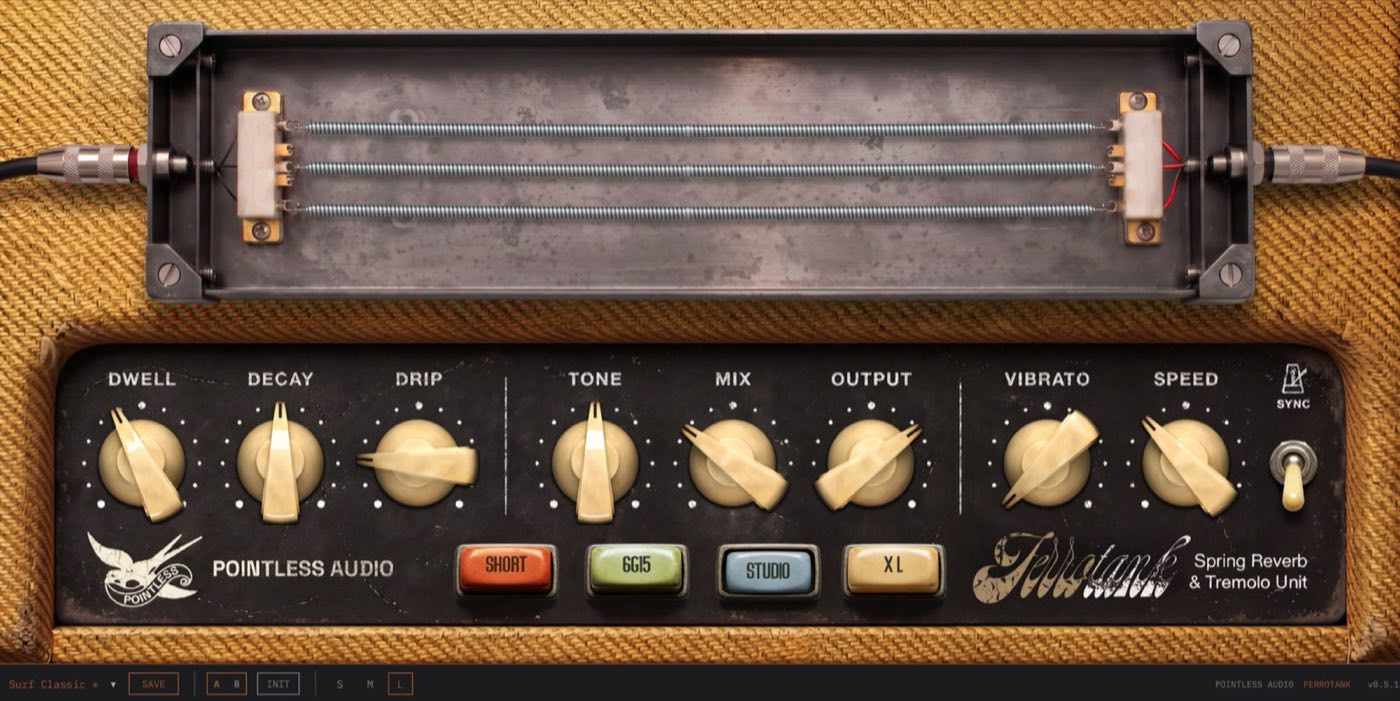
Strike, pluck or damp the springs with the mouse, or play them from a MIDI key. Behind them, the whole tube circuit that defined surf guitar. The drip is the point.
- VST3 + AU + CLAP
- macOS (Universal) + Windows 10+ (VST3 + CLAP)
- Instant download via Gumroad
- macOS builds notarized by Apple
- No account. No iLok. No subscription.
Audio demos are being recorded — dry against wet, same take, no cherry-picking.
Play the springs
The spring tank on the panel is playable. A quick click strikes a spring, as hard as you move. Press, pull and let go to pluck it. Hold it to rest a hand on it and damp the tail. Click the frame and you knock the whole tank.
From a MIDI key
Pick a MIDI device in the new MIDI panel and play the springs from a key or a pad, with true velocity: the plugin reads the device itself, no routing in the DAW. Fast repeats scrape the spring, a chord knocks the tank, the sustain pedal rests a hand on it.
The whole tube circuit
Not an impulse response, not a hall algorithm. A model of the whole tank: a tube preamp that drives the springs, the springs with their unmistakable chirp, and a vintage bias-style tremolo on the way out.
DWELL, DRIP, DECAY
DRIP takes it from a soft, warm wash to a full surf drip — on every tank. DWELL works like the original pot, from silence to a driven tank. Hit it hard enough and it crashes — because that’s what a real spring tank does.
Four tanks
Switch TANK and the whole spring geometry changes underneath — different lengths, different resonances, different drip. Two springs in the 6G15, tuned against a real unit.
Bright by choice
Two knobs from Dick Dale to Pharoah Sanders: a subtle wash behind a clean guitar at one end, full drip-and-splash surf crash at the other. Guitars, keys, drums and synths all take to it.
Touch from the mouse and from MIDI: the springs answer with strength.
- Touch
- A quick click strikes a spring with a strength that follows the pointer speed. Press, pull and let go to pluck it, where you grabbed it. Hold it to damp the tail and take out the highs; pull it while held and it rises in pitch; drag sideways to rub the coils.
- Signal path
- The touch now goes through TONE, MIX, the tremolo and OUTPUT: at MIX 0 it is silent. A recording of a real tank gives the first 150 ms of a strike and feeds the modelled springs, so the tail follows TANK, DRIP and DECAY. The two-spring tanks play it in stereo.
- MIDI
- A MIDI panel on the bottom strip: a device the plugin reads itself, a channel, a touch key you can learn, and three release behaviours. Velocity is the strength of the strike; pitch bend and aftertouch bend the pitch, CC 1 sets the hand. Notes routed by the DAW are not used in this version.
- Touch parameter
- One new host parameter, Touch, for MIDI mapping or automation. It is not on the panel and is not saved with the project.
Already have Ferrotank? Same Gumroad link: download it again. Projects saved with 0.7 open with the same settings, and the sound is the same unless you use the new touch features.
The 6G15 reverb unit (1961–1963) was a standalone, tube-driven spring reverb built to sit ahead of a guitar amp. Its own tube preamp drove a spring tank hard, producing a dripping, splashy chirp with far more character than the reverb built into the amps of the day.
That sound became one of the defining textures of early-1960s surf music — the reverb most associated with Dick Dale — and it has stayed a studio favourite for surf, garage and cinematic guitar ever since.
Ferrotank models the character of that circuit — the tube warmth, the spring chirp, the tank resonances — not any specific artist or recording. Recordings of a real tank give the first moments of a strike when you play the springs; the reverb itself is the model.
- Formats
- VST3 + AU + CLAP
- Platforms
- macOS (Universal) + Windows 10+ (VST3 + CLAP)
- Version
- v0.8.0
- License
- Perpetual — no account, no iLok, no subscription
- Manual
- Online manual · PDF
- Price
- Free until 25 October
Or get all six in one download — The Pointless Collection, free until 25 October.
-
01
Get it on Gumroad
Checkout runs on Gumroad. It’s free: enter 0 in the price field. The download link lands in your inbox.
-
02
Download the zip
Inside: VST3 + AU + CLAP builds and the manual as PDF. macOS builds are notarized — no Gatekeeper drama.
-
03
Install, rescan, done
macOS: run the signed installer in the zip and pick your formats. Windows: copy the plugin into your plugin folder. Rescan in your DAW. No account, no activation. The manual has the exact paths.
How do I install it?
On macOS, run the installer inside the zip: it is signed and notarized, and lets you pick the formats. On Windows, copy each format into your plugin folder. Then rescan in your DAW. The manual walks through the exact paths.
Do I need an account, a dongle, or an internet connection?
No account, no iLok, no subscription, no activation. Once installed it runs fully offline, forever.
Does it work in my DAW?
Any host that loads VST3 + AU + CLAP: Logic Pro, Ableton Live, Reaper, Bitwig, Cubase, Studio One, FL Studio and friends. No AAX — Pro Tools is not supported.
Windows says the file is from an unknown publisher.
Windows builds are not code-signed yet, so SmartScreen may warn on first run. The zip you download from Gumroad is the zip we built — choose “Run anyway” or unblock the file in Properties.
Refunds?
Payments run through Gumroad, refunds follow Gumroad’s policy. If something is broken, write to [email protected] first — most problems are a five-minute fix.
Are updates free?
Yes — free updates within the current major version, delivered through the same Gumroad link.