PORTATWIN
Manual
v2.1.0 · VST3 + AU + CLAP · macOS (Universal) + Windows 10+ (VST3 + CLAP)
What it does
PortaTwin models a 4-track cassette recorder released in 1987, the kind of machine many bedroom recordings were made on. Its preamp clipped early, its transport wobbled, and its tape hissed.
PortaTwin follows its tape path: the wow and flutter of an aging transport, the hiss and bandwidth loss of worn tape, and the noise reduction that tried to tame it all. Around the tape sits its mixer, modelled stage by stage from measurements of a real unit: it colors and saturates as you push it. The factory presets run from light tape colour (Classic Tape) to heavy saturation, flutter and wear (Full Destruction).
The four-track legacy
Introduced in 1979, the Portastudio was the first 4-track cassette recorder: it put a recording studio in a bedroom. The machine that started the family gave us Bruce Springsteen's Nebraska in 1982, when a record made at home was still an accident. By 1987, with the Tascam Porta Two, it was normal.
The Porta Two put a six-channel mixer, an effects send and four tracks on one cassette. It is the generation of machine behind a decade of records that were never supposed to be released: Elliott Smith's Roman Candle was recorded on a four-track, Iron & Wine's The Creek Drank the Cradle at home on a four-track cassette recorder. Those records were made on the machines, not with this plugin.
PortaTwin models one machine from that family, the 1987 four-track: its mixer, measured on a real unit, its tape and transport, and a noise reduction tuned by ear.
Parameters
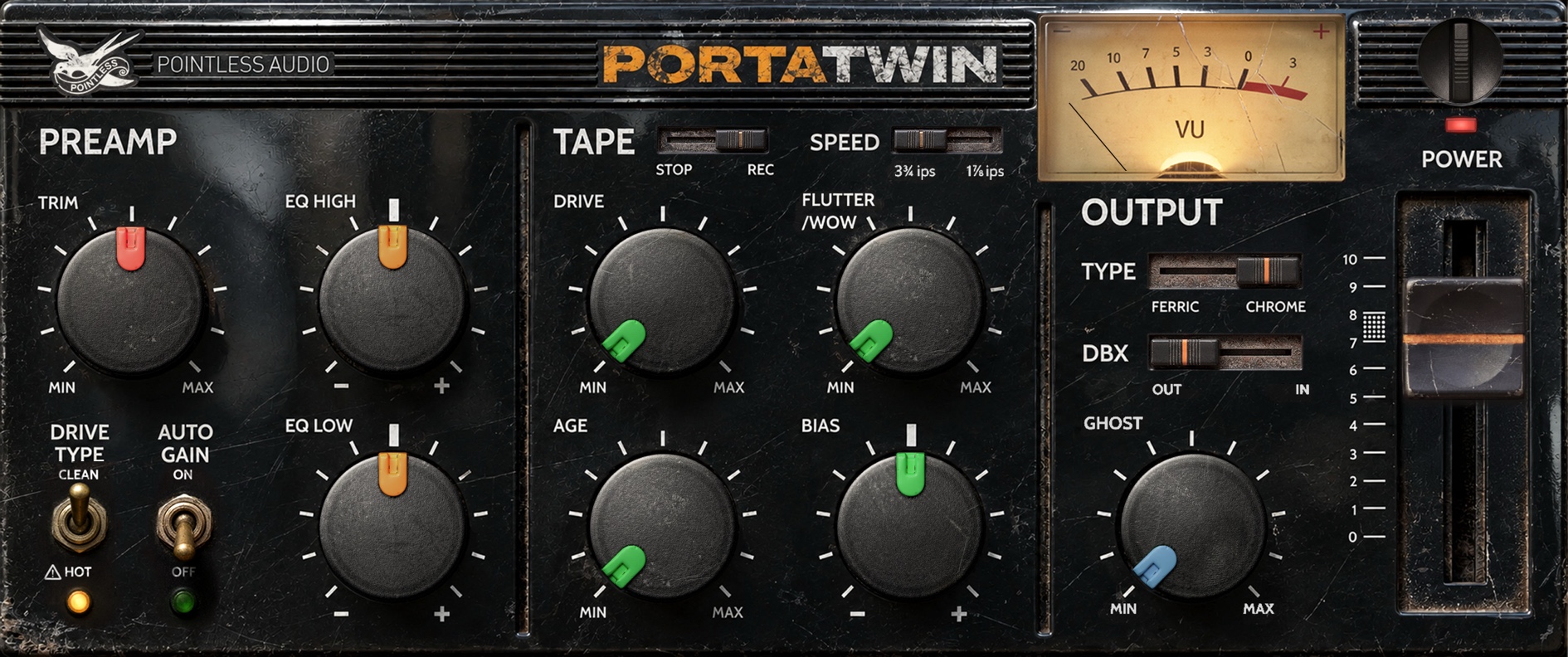
PortaTwin has sixteen controls across three sections: a preamp that colours the front end, a tape section that does most of the character, and an output stage. All of them are automatable. The panel labels a few of them the way the original deck did: TRIM is INPUT, DRIVE TYPE is CLEAN / HOT, the TAPE switch (STOP / REC) is TAPE IN, and POWER is the bypass. FLUTTER is labelled FLUTTER / WOW, and TYPE shows FERRIC / CHROME. On the panel, TYPE and DBX (OUT / IN) sit in the OUTPUT section and AUTO GAIN sits in the PREAMP section; the tables below group the controls by function. The names the host shows are listed under Parameter names in the host.
PREAMP
In new projects this section is the four-track's mixer channel: the input stage with its TRIM, the channel fader, and a gain stage that carries the EQ. Projects saved with an earlier version keep the earlier preamp: see Projects from earlier versions, below.
| Parameter | Range | Default | What it does |
|---|---|---|---|
| INPUT | 0–1 | 0.5 | Left half: attenuator. Right half: the TRIM, from line level at the centre to +40.1 dB |
| EQ LOW | 0–1 | 0.5 | Boost or cut at 100 Hz, −9.1 to +9.5 dB |
| EQ HIGH | 0–1 | 0.5 | Boost or cut at 10 kHz, −10.7 to +10.2 dB |
| CLEAN / HOT | toggle | CLEAN | Channel fader at its reference mark (CLEAN) or all the way up (HOT) |
INPUT — the left half turns the signal down, from 0 dB at the centre to silence at the bottom. The right half is the four-track's TRIM: line level at the centre, +40.1 dB at full. It follows the law measured on the real pot, with most of its gain in the upper half of its travel: about +13 dB with INPUT at three-quarters, about +32 dB at seven-eighths. Push it and the input stage clips, one side slightly before the other, as the real one does. The readout shows the gain in dB.
LOW / HIGH — the four-track's EQ, built into the gain stage after the fader. LOW sets the gain at 100 Hz, from −9.1 to +9.5 dB; HIGH at 10 kHz, from −10.7 to +10.2 dB. Because the EQ is part of an amplifier stage, a boosted band is the first to hit that stage's limit, and HOT pushes the stage 9.4 dB harder.
CLEAN / HOT — the channel fader. CLEAN leaves it at its reference mark. HOT pushes it all the way up: everything between the fader and the master — the gain stage with the EQ, and the tape — runs 9.4 dB hotter, and the master comes down 9.4 dB to compensate. A quiet signal comes out at the same level in both modes; a loud one distorts more in HOT. INPUT stays where it is when you switch.
TAPE
| Parameter | Range | Default | What it does |
|---|---|---|---|
| DRIVE | 0–1 | 0.0 | How hot you print to tape: clean at 0, nominal level at half, +12 dB over at full. The output level holds up to half and drops at full (see below) |
| FLUTTER | 0–1 | 0.0 | Pitch wobble from an unsteady transport |
| AGE | 0–1 | 0.0 | Overall tape wear — hiss, lost highs, dropouts, extra saturation |
| BIAS | 0–1 | 0.5 | The deck's internal bias trim. Centre is the sweet spot; below it gets grainy and bright, above it gets darker and rounder |
| SPEED | toggle | 3¾ips | Tape speed. The slower speed is noisier, narrower, more wow |
| TYPE | toggle | II | Tape formulation — Type I (ferric) or Type II (chrome) |
| TAPE IN | toggle | on | Switches the whole tape section in or out |
| DBX | toggle | off | Noise reduction — pulls the hiss down when the signal is quiet |
DRIVE — how hot you print to tape, in dB rather than a volume boost: at 0 the tape barely notices, at half you sit at the deck's nominal level (the way a cassette sits at 0 VU), at full you are 12 dB over and the tape squeezes hard. The output level holds up to half; at full it sits about 5 dB lower as the tape squeezes (measured with a 1 kHz sine at −18 dBFS RMS; the drop depends on the signal). What the knob really changes is the saturation, the softening of transients and the high-end compression. It glides in smoothly when you automate it, with no zipper noise.
FLUTTER — the sound of an unsteady transport: slow wow underneath, faster flutter on top, and a slow random drift. Subtle at low settings, seasick at the top.
AGE — one knob for tape wear. The first stretch is gentle: past about 15 % the odd short dropout appears. Hiss starts at about 45 % and grows steeply towards the top; the top end starts to soften from around the middle of the travel (earlier at 1⅞ ips), and towards the top the saturation grows and the dropouts get deeper and more frequent — from a slightly tired tape to a badly worn one.
BIAS — the deck's internal bias trimmer, the adjustment a tech makes for a given tape. Centre is the sweet spot: cleanest, most open. Turn it down and the tape is under-biased: brighter, grainier, more distortion and a little modulation noise, with a touch less level — usable grit, not a fault. Turn it up and it is over-biased: darker with every step, smoother, slightly lower in level. Every few clicks change something; there is no dead zone and no cliff.
SPEED — the difference between the two cassette speeds. The slower speed narrows the bandwidth, lifts the hiss and deepens the wow — the classic long-record-time cassette sound.
TYPE — the tape formulation. Type I (ferric) is noisier and saturates earlier with a little low-end lift; Type II (chrome, what the original deck used) is cleaner and wider.
TAPE IN — bypasses the tape section (drive, flutter, age, bias, hiss, dbx) when off, leaving just the PREAMP section. GHOST is not part of this: it sits after the tape section and stays active either way — see the note under GHOST below.
DBX — noise reduction. It ducks the hiss when things go quiet and opens back up when the signal returns, with the faint pumping "breath" that real dbx-equipped decks had. It isn't modelled from the circuit — just tuned to feel like it.
OUTPUT
| Parameter | Range | Default | What it does |
|---|---|---|---|
| OUTPUT | 0–1 | 0.715 | Master fader — unity at the default, +6 dB at full |
| GHOST | 0–1 | 0.0 | Two tape artifacts in one knob — azimuth smear, then print-through echo |
| AUTO GAIN | toggle | off | Evens out the level changes from the PREAMP and TAPE sections |
| BYPASS | toggle | off | Full bypass |
OUTPUT — the four-track's master fader, in front of its output amplifier. Unity sits at the default position, about 70 % of the way up, with 6 dB more above it and a mute at the very bottom. Above unity it pushes the output amplifier towards its own clipping: at +6 dB the clipping starts 6 dB sooner.
GHOST — two cassette artifacts on one control. The first half smears the stereo image the way a misaligned head does. From a quarter up, print-through adds a single echo 150 ms after the signal: out of earshot at first, about −12 dB at 65 %, −7 dB at full. At zero it's off. It stays active even with TAPE IN switched off — turning TAPE IN off bypasses the tape section itself, not GHOST.
AUTO GAIN — evens out the loudness changes the PREAMP section and tape saturation introduce, so automating or A/B-ing stays level-matched. It's calibrated around a signal sitting at about −18 dBFS — a healthy, hot-ish mix level. Feed it something much quieter and the compensation drifts, because it's reading the position of the controls rather than your actual input level; if your source is well below that, raise INPUT first rather than counting on AUTO GAIN to make up the difference.
VU meter — reads PortaTwin's output, after AUTO GAIN and OUTPUT: averaged rather than peak, with the lazy swing and slight overshoot of a real analog needle. 0 VU is the original deck's nominal level (−10 dBV at its line output), which PortaTwin puts at −20.5 dBFS RMS. Watch it for sustained level, not transient snaps. It rests at the bottom when bypassed.
Parameter names in the host
| Host name | Panel label | Readout |
|---|---|---|
| Input Gain | TRIM | −inf dB to 0.0 dB (left half), 0.0 to +40.1 dB (right half) |
| EQ Low | EQ LOW | −9.1 to +9.5 dB |
| EQ High | EQ HIGH | −10.7 to +10.2 dB |
| Gain Mode | DRIVE TYPE | CLEAN / HOT |
| Drive | DRIVE | 0 % to 100 % |
| Flutter | FLUTTER / WOW | 0 % to 100 % |
| Age | AGE | 0 % to 100 % |
| Bias | BIAS | −100 % to +100 % (0 % at the centre) |
| Speed | SPEED | 3.75 ips / 1.875 ips |
| Tape In | STOP / REC | On / Off |
| Tape Type | TYPE | Type I / Type II |
| DBX | DBX | On / Off |
| Output Level | OUTPUT fader | −inf dB to +6.0 dB (0.0 dB at the default) |
| Ghost | GHOST | 0 % to 100 % |
| Bypass | POWER | On = bypassed |
| Auto Gain | AUTO GAIN | On / Off |
On an instance that uses the earlier preamp, Input Gain reads −inf dB to +18.1 dB and EQ Low and EQ High read −15.0 to +15.0 dB.
Factory presets
All factory presets use the mixer. The fifteen from version 2.0 keep their names and character, retuned for it: about the same distortion as before, level-matched to the bypassed signal. The last three are new.
| # | Preset | Character |
|---|---|---|
| 1 | Init | Clean starting point — tape in, no drive, flutter or wear |
| 2 | Classic Tape | Gentle tape color, transparent |
| 3 | Bedroom 4-Track | Classic lo-fi, Type I, flutter + age |
| 4 | Cassette Dub | Dub-style with flutter + ghost |
| 5 | Slow Burn | Degraded tape, heavy flutter, worn oxide |
| 6 | Ghost Town | GHOST at 90 %: azimuth smear at its maximum, print-through about −7 dB; Type I, flutter and wear |
| 7 | Vocal Air | HOT warmth for vocals with subtle air |
| 8 | Drum Glue | Tape compression + saturation for drum bus |
| 9 | Guitar Rock | HOT mode edge for electric guitar |
| 10 | Bass Fat | LOW boost + tape saturation for bass |
| 11 | Synth Mellow | Gentle filtering and warmth for synths |
| 12 | DBX Squeeze | HOT + DBX compression with auto gain |
| 13 | Tape Crush | Heavy tape saturation with flutter |
| 14 | Full Destruction | Everything cranked — sound design |
| 15 | Service Manual | The machine as its factory service manual specifies it: 1⅞ ips, Type II, reference drive, flutter and noise |
| 16 | Line Level | The mixer at line level, CLEAN, EQ at centre, light tape at 1⅞ ips |
| 17 | Trim Crunch | TRIM at +24 dB, into the input stage's clipping — CLEAN, light tape |
| 18 | Fader Heat | HOT with LOW up 5.2 dB: the low end saturates first |
User presets are saved as portable .papreset files (shareable between machines and projects). Browse them from the preset name in the bottom strip. A/B comparison: click A/B to flip between two sets of settings — the one you leave is kept, so you can tweak B and jump back to A. The two slots live while the plugin window is open; the DAW project saves only the settings you are on.
Projects from earlier versions
Version 2.1 puts the four-track's mixer where the preamp was. Projects, user presets and presets saved by your DAW with an earlier version open with the preamp of version 2.0 and sound as they did there. They keep that preamp when you save them again, and so do user presets you save from them. The one change is POWER: an instance saved switched off now opens switched off (see Troubleshooting).
There is no switch: the preamp travels with the settings.
- New instances, factory presets and Init use the mixer.
- Anything saved with an earlier version uses the earlier preamp.
- Each A/B slot keeps the one it was set with.
Loading a factory preset or Init into an instance on the earlier preamp moves it to the mixer, with a 20 ms crossfade. Existing automation then drives the mixer, where the same knob positions give different gains. To go back, reopen the project without saving, load a user preset made on the earlier preamp, or switch A/B if the other slot still holds the old settings. If your DAW loads a default preset you saved with an earlier version, new instances start on the earlier preamp too: load Init and save the default again.
The panel doesn't show which one an instance uses; the readouts do. Turn LOW all the way up: it reads +15.0 dB on the earlier preamp, +9.5 dB on the mixer.
On the earlier preamp the controls work as they did in version 2.0:
- INPUT is a front-end gain: unity at the centre, +18.1 dB at full.
- LOW and HIGH are shelving filters at 100 Hz and 6.5 kHz, ±15 dB.
- HOT overdrives the preamp. The EQ sits between its two drive stages, so boosting LOW feeds the distortion. Each mode keeps its own INPUT position while the plugin window is open.
- OUTPUT is a level trim, with the same law as the mixer's master.
- The VU reads after GHOST, before AUTO GAIN and OUTPUT, with 0 VU at −18 dBFS RMS.
- There is no mixer noise.
The earlier preamp is also darker and a little fuller at the bottom: at Init, 10 kHz sits about 4 dB lower and 40 Hz about 1.4 dB higher than on the mixer, both relative to 1 kHz.
How it works
You don't need any of this to use PortaTwin — but if you're curious what's happening to your signal:
The mixer is the front end of every new project: the four-track's mixer, modelled stage by stage from measurements of a real unit. Before the tape come the input stage with its TRIM, the channel fader, a gain stage that carries the EQ, and the mix bus; after the tape, the master fader and the output amplifier. Each amplifier stage has its own clipping curve, measured on the real unit, with different limits on the positive and negative side. The coupling capacitors of the circuit are in the model too: with the tape section off, the mixer is flat within 0.2 dB from 1 kHz to 18 kHz and about 1 dB down at 40 Hz. Its faint background noise is there as well, at the level measured on the real unit, even with no input and with the tape section off. Projects saved with earlier versions keep the preamp of version 2.0: see Projects from earlier versions.
The tape does most of the work. DRIVE, BIAS, TYPE and SPEED model the magnetic side — how tape soft-limits when you hit it, how the low end blooms, how the top rolls off with speed and wear. AGE ties the wear together into one knob: hiss, lost highs and dropouts. Wow and flutter come from the transport, not the tape, so FLUTTER moves independently of AGE — a machine can have a steady transport and worn tape, or the other way round.
The noise reduction chases the hiss down when the signal is quiet and lets go when it returns, complete with the faint "breathing" that gave real dbx decks their sound.
It's a model of the whole machine rather than a chain of presets, which is why pushing it too far degrades gracefully — it saturates and falls apart like tape instead of clipping like a converter.
Design notes
Ghost is not a dry/wet mix. It introduces two physical tape artifacts into the signal itself — it doesn't blend a dry copy back in. At zero, it's completely off.
Flutter and age are independent. Wow and flutter come from the transport; hiss, dropouts and lost highs come from the tape. A machine can have a perfect transport and worn-out tape, or a steady tape and a wobbly transport — so the two knobs don't track each other.
Type and speed are separate. Tape formulation and transport speed are different physical properties with different sonic effects, so they stay independent controls.
CLEAN/HOT moves the distortion, not the level. HOT is the channel fader all the way up, with the master pulled down to match: a quiet signal comes out at the same level, a loud one distorts more after the fader. The TRIM half of INPUT drives the input stage in both modes.
The tone controls live inside an amplifier. The EQ is part of the gain stage after the fader, just as it is in the circuit, so a boosted band is the first to reach that stage's limit.
Dropouts lose the highs first. On real tape the top end vanishes before the volume drops during a dropout, and PortaTwin follows that order rather than just ducking the level.
The whole chain clips softly. Nothing in the signal path hits a hard digital ceiling — it saturates and rounds over instead, so overdriving it stays musical.
Installation
macOS
Double-click the .pkg installer in the download and follow it — the Customize step lets you pick VST3, AU and CLAP. Formats install system-wide to /Library/Audio/Plug-Ins/VST3/, Components/ and CLAP/. Restart your DAW.
Note: The installer is signed with an Apple Developer ID and notarized by Apple — macOS opens it directly, with no security warnings.
Windows
Copy the PA PortaTwin.vst3 folder to C:\Program Files\Common Files\VST3\, and/or the PA PortaTwin.clap file to C:\Program Files\Common Files\CLAP\ — or to the custom plugin folders your DAW uses. Restart your DAW.
Note: SmartScreen may warn — click "More info" → "Run anyway". Windows binary is not Authenticode signed.
Troubleshooting
VU meter looks sluggish on transients — by design. It has the weighted, slightly slow feel of a real VU meter: it reads average level, not peaks, so it deliberately lags sharp transients. Watch it for sustained level, not snaps — it's calibrated so 0 VU sits at a healthy mix level.
Plugin doesn't appear in DAW — most DAWs rescan plugins on launch. In Logic Pro: Preferences → Plug-In Manager → Reset & Rescan. In Ableton: Preferences → Plug-Ins → Rescan. In Reaper: Preferences → Plug-ins → VST → Re-scan.
State doesn't persist between sessions — verify your DAW saves plugin state in the project. PortaTwin uses APVTS standard, supported by every modern DAW. POWER is saved too: since v2.1.0 a project saved with PortaTwin switched off reopens with it off (earlier versions always switched it back on).
Sample-accurate alignment with FLUTTER engaged — PortaTwin doesn't report a fixed plugin-delay-compensation value to the host. With FLUTTER at zero the processing delay is a handful of samples (about 0.2 ms), inaudible and stable. Turn FLUTTER up and the wow-and-flutter transport modelling adds a delay that keeps drifting by design — it's the same wobble that colours the pitch. On average it's about 1 ms at 25 %, 2–4 ms at 50 %, 5–8 ms at 75 % and 10–15 ms at 100 %; the higher figures come with AGE up and the tape at 1.875 ips, and at full FLUTTER the delay swings between roughly 7 and 22 ms. There's no single number the plugin could report that would stay correct. On a single track you won't hear it; if you blend PortaTwin with the dry signal on a parallel bus, or use it on one mic of a multi-mic recording, keep FLUTTER low or nudge the track manually rather than relying on your DAW's automatic delay compensation.
Mono track, stereo output — PortaTwin takes a mono or a stereo input and always outputs stereo. With a mono input both output channels carry the signal, also when POWER or your DAW's bypass is off. Before v2.1.0 the right channel stayed silent in bypass on a mono track, so the sound jumped to the left.
Reset in the host — Reset clears the plugin's filters, delay lines and tape state and leaves the controls where they are. Before v2.1.0 it did nothing. Since v2.1.0 a NaN or infinite sample at the input is treated as silence; before, one such sample could leave the output invalid until the host re-initialised the plugin.
Credits
- Inspired by a 1987 four-track cassette recorder (see The four-track legacy). Tuned by ear against a real unit.
- Brand, name and visual language: Pointless Audio, 2026.
- The licence and the third-party notices are in
LICENSE.txt, in the download.
Support
Bug reports, questions, feature requests: [email protected]
What to include so it gets fixed faster: https://pointlessaudio.studio/support/
Pointless Audio pointlessaudio.studio
PortaTwin is not affiliated with or endorsed by TEAC Corporation or the Tascam brand. Tascam, Portastudio, and Porta Two are trademarks of TEAC Corporation; dbx is a trademark of Harman International Industries, Inc. This is an independent project inspired by the Tascam Porta Two Ministudio.
© 2026 Pointless Audio · pointlessaudio.studio