PORTATWIN
The preamp clips early. That's the point.
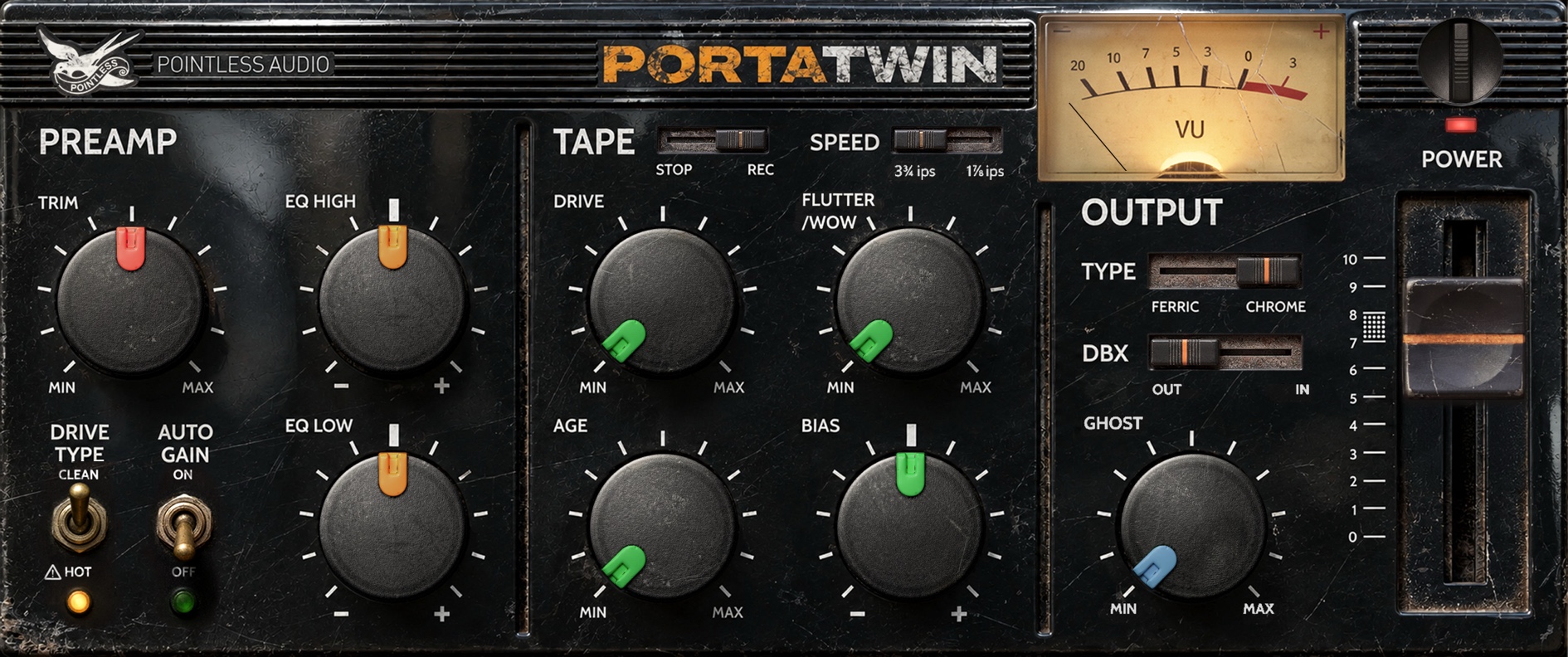
Cassette channel strip modeled after a 1987 four-track cassette recorder. The preamp clips early and the tape wears out. We kept both.
- VST3 + AU + CLAP
- macOS (Universal) + Windows 10+ (VST3 + CLAP)
- Instant download via Gumroad
- macOS builds notarized by Apple
- No account. No iLok. No subscription.
“I thought this was going to be another gimmick but it is REALLY good. The Wow/Flutter knob gives my guitars a super 3D sound.”
Audio demos are being recorded — dry against wet, same take, no cherry-picking.
A mixer that clips early
New projects run through the four-track’s mixer, modeled stage by stage from measurements of a real unit, each stage clipping on its own curve. From clean analog coloring to full tape destruction: the input colors everything it touches.
Tape that drifts
Wow, flutter, and a BIAS control you can push until the top end gives up. The transport wobbles because the original transport wobbled.
Noise reduction that breathes
Tuned by ear, not modeled from the circuit. It ducks the hiss in quiet passages and breathes back in. Built to tame the hiss, it ends up shaping the sound.
Crosstalk and a head bump
Tracks bleed into each other, more as the tape wears. The low end swells with DRIVE: at half, 0.6 dB past the service manual’s limit.
Where it works
Drum bus, synths, guitars, full mixes when you’re feeling brave. Not the most accurate “studio tape” plugin. The one that makes a demo sound like a record you found in a drawer.
16 parameters, 18 presets
Everything automatable, POWER included. Presets from subtle analog glue to full lo-fi collapse, plus one that sets the machine up the way its service manual does.
The four-track’s mixer, measured on a real unit, at less than half the CPU of 2.0.
- Mixer
- New instances, factory presets and Init run through a model of the four-track’s mixer: input stage, fader and EQ before the tape, master and output amplifier after it. Each stage clips on its own measured curve, and the mixer’s faint background noise is there at its measured level. The controls are the same sixteen: the right half of INPUT is now the TRIM, up to +40.1 dB; LOW and HIGH work at 100 Hz and 10 kHz, about ±10 dB; HOT pushes the channel fader 9.4 dB up and pulls the master down by as much.
- CPU
- About 3.7 % of one core on an Apple Silicon Mac at 48 kHz with a 128-sample buffer. In the worst case we measured, 3.74 % against 8.21 % for 2.0.
- Fixed
- A single invalid sample at the input no longer leaves both channels silent until the host re-initialises the plugin. Host Reset now clears filters, delay lines and oversampling. On a mono track with a stereo output, bypass no longer leaves the right channel silent. A project saved with POWER off reopens with it off.
- Logic on Tahoe
- The preset bar in the bottom-left corner keeps responding after the window is moved or resized in Logic, GarageBand and MainStage on macOS Tahoe.
- Interface
- Faceplate and the DRIVE TYPE and AUTO GAIN switches redrawn from the retouched artwork. Knobs and layout unchanged.
- Presets
- Three new factory presets. The fifteen from 2.0 keep their names and character, retuned for the mixer: about the same distortion as before, level-matched to the bypassed signal.
Already have PortaTwin? Same Gumroad link: download it again. Projects saved with 2.0 open with the same settings and keep the preamp they were made with, even when you save them again: they sound as they did.
Introduced in 1979, the Portastudio was the first four-track cassette recorder. It put a recording studio in a bedroom. The machine that started the family gave us Bruce Springsteen’s Nebraska in 1982, when a record made at home was still an accident.
By 1987 it was normal. The Tascam Porta Two put a six-channel mixer, an effects send and four tracks on one cassette. It is the generation of machine behind a decade of records that were never supposed to be released.
Elliott Smith’s Roman Candle was recorded on a four-track. Iron & Wine’s The Creek Drank the Cradle was recorded at home on a four-track cassette recorder. Daniel Johnston, R. Stevie Moore, Sebadoh and The Microphones came out of the same home-taping scene. All of it was made on the machines, not with this plugin.
PortaTwin models one machine from that family, the 1987 four-track: its mixer, measured on a real unit, its tape and transport, and a noise reduction tuned by ear.
Tascam, Portastudio and Porta Two are trademarks of TEAC Corporation. Pointless Audio is not affiliated with, endorsed by, or sponsored by TEAC. Product names are used solely to describe the hardware that inspired this plug-in.
- Formats
- VST3 + AU + CLAP
- Platforms
- macOS (Universal) + Windows 10+ (VST3 + CLAP)
- Version
- v2.1.0
- License
- Perpetual — no account, no iLok, no subscription
- Manual
- Online manual · PDF
- Price
- Free until 25 October
Or get all six in one download — The Pointless Collection, free until 25 October.
-
01
Get it on Gumroad
Checkout runs on Gumroad. It’s free: enter 0 in the price field. The download link lands in your inbox.
-
02
Download the zip
Inside: VST3 + AU + CLAP builds and the manual as PDF. macOS builds are notarized — no Gatekeeper drama.
-
03
Install, rescan, done
macOS: run the signed installer in the zip and pick your formats. Windows: copy the plugin into your plugin folder. Rescan in your DAW. No account, no activation. The manual has the exact paths.
How do I install it?
On macOS, run the installer inside the zip: it is signed and notarized, and lets you pick the formats. On Windows, copy each format into your plugin folder. Then rescan in your DAW. The manual walks through the exact paths.
Do I need an account, a dongle, or an internet connection?
No account, no iLok, no subscription, no activation. Once installed it runs fully offline, forever.
Does it work in my DAW?
Any host that loads VST3 + AU + CLAP: Logic Pro, Ableton Live, Reaper, Bitwig, Cubase, Studio One, FL Studio and friends. No AAX — Pro Tools is not supported.
Windows says the file is from an unknown publisher.
Windows builds are not code-signed yet, so SmartScreen may warn on first run. The zip you download from Gumroad is the zip we built — choose “Run anyway” or unblock the file in Properties.
Refunds?
Payments run through Gumroad, refunds follow Gumroad’s policy. If something is broken, write to [email protected] first — most problems are a five-minute fix.
Are updates free?
Yes — free updates within the current major version, delivered through the same Gumroad link.